
Chapter 17 · 17.9
ISO week numbers, including around the turn of the year
A production schedule, a rota or a weekly sales overview: in most of Europe you count weeks according to the European standard (ISO 8601). Week 1 is the week containing the first Thursday of the year, and a week starts on Monday. By default, the WEEKNUM function counts the American way: week 1 is the week of 1 January and a week starts on Sunday. For most of the year the difference is a week or nothing at all, but around the turn of the year it goes wrong. And 2026 is one of those years: it has 53 weeks.
As an example, we use the production schedule of Bakkerij De Korenaar, with dates around Christmas and New Year in column A.
The difference in one table
| Date | =WEEKNUM(A2) | =ISOWEEKNUM(A2) | Week year |
|---|---|---|---|
| Fri 25/12/2026 | 52 | 52 | 2026 |
| Mon 28/12/2026 | 53 | 53 | 2026 |
| Fri 01/01/2027 | 1 | 53 | 2026 |
| Sun 03/01/2027 | 2 | 53 | 2026 |
| Mon 04/01/2027 | 2 | 1 | 2027 |
According to the ISO count, Friday 1 January 2027 still belongs to week 53 of 2026. The American count makes it week 1, and Sunday 3 January even week 2.
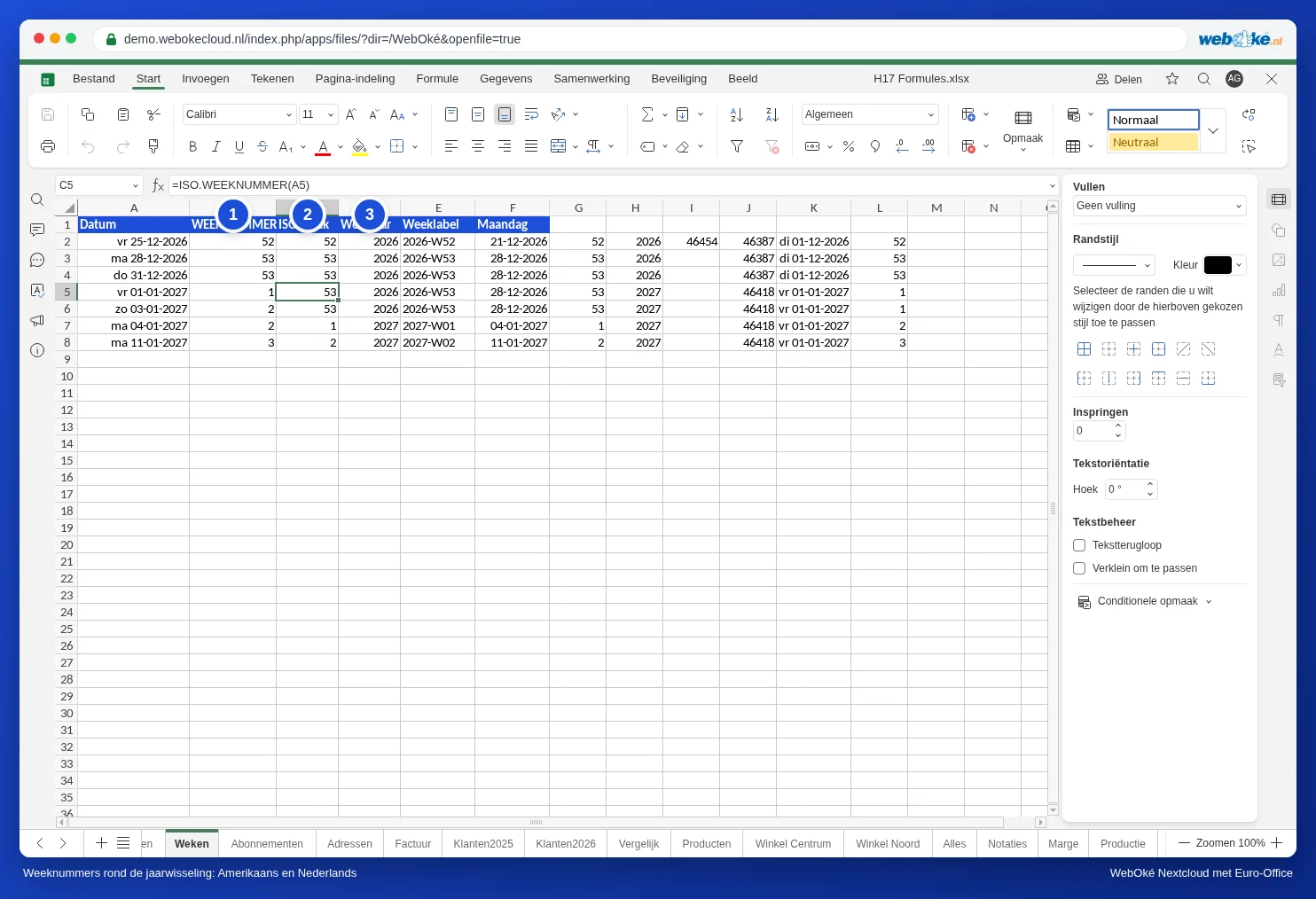
Step 1: the correct week number
Type =ISOWEEKNUM(A2) in B2 and drag the formula down. You can also use =WEEKNUM(A2,21): the number 21 as the second argument also means the European count. That's handy if a colleague opens the file in an old version of Excel that doesn't know ISOWEEKNUM.
Step 2: the correct year for the week number
If you combine week and year, =YEAR(A2) goes wrong: 1 January 2027 then becomes "week 53 of 2027", a week that doesn't exist. The week year is the year of the Thursday in the same week:
=YEAR(A2-WEEKDAY(A2,2)+4)
WEEKDAY(A2,2) returns 1 for Monday up to 7 for Sunday. A2 minus the weekday plus 4 is therefore the Thursday of that week, and the YEAR of that date is the week year.
Step 3: a label you can sort
For an overview or a pivot table by week, a label such as 2026-W53 is handy: it sorts correctly by itself, even across the year boundary.
=YEAR(A2-WEEKDAY(A2,2)+4)&"-W"&TEXT(ISOWEEKNUM(A2),"00")
TEXT with "00" adds a leading zero to weeks below 10, so week 2 appears as W02 before W10.
Useful formulas for a weekly schedule
| What | Formula | Example |
|---|---|---|
| Monday of the week | =A2-WEEKDAY(A2,2)+1 | 01/01/2027 gives 28/12/2026 |
| Sunday of the week | =A2-WEEKDAY(A2,2)+7 | 01/01/2027 gives 03/01/2027 |
| Monday of week 10 of 2027 | =DATE(2027,1,4)-WEEKDAY(DATE(2027,1,4),2)+1+(10-1)*7 | 08/03/2027 |
| Last day of the month | =EOMONTH(A2,0) | 25/12/2026 gives 31/12/2026 |
| First day of the month | =EOMONTH(A2,-1)+1 | 25/12/2026 gives 01/12/2026 |
If you see a number such as 46,387 instead of a date, give the cell a date format (see Formatting numbers, dates and currency). EOMONTH and calculated dates don't always get one automatically.
The formula for the Monday of a given week works like this: 4 January always falls in week 1. Starting from the Monday of that week, you add (week minus 1) times 7 days. If you put the year and the week number in separate cells, replace 2027 and 10 with those cells.
Sales per week
Put the week label from step 3 in a helper column next to your sales. You can then total by week with SUMIFS on that helper column (see Adding up sales per month or per period with SUMIFS), or put the helper column under Rows in a pivot table. Grouping by 7 days in a pivot table does not give ISO weeks: see A pivot table by month, quarter or week.
Pitfalls
- =WEEKNUM(A2,2) does start the week on Monday, but still counts from 1 January. So that is not the ISO count: 1 January 2027 becomes week 1. Use 21, not 2.
- A year has 52 or 53 weeks. So don't fix a schedule at 52 weeks.
- If the date is stored as text in the cell (left-aligned), the formula returns #VALUE!. Convert the dates first: see Dates that come in as text or have day and month swapped.