
Module 2 · 2.1
English
Writing a good description
Module 2: The first version · Reading time: 9 minutes
Learning objective: After this lesson you can write a description from which the AI Builder creates a first version that suits your business, and you know what the builder does with a description that is too short or too long.
Key concepts: start card, New website, description, build language, follow-up question, main action, tone, form of address, key facts, colour preference
The start screen
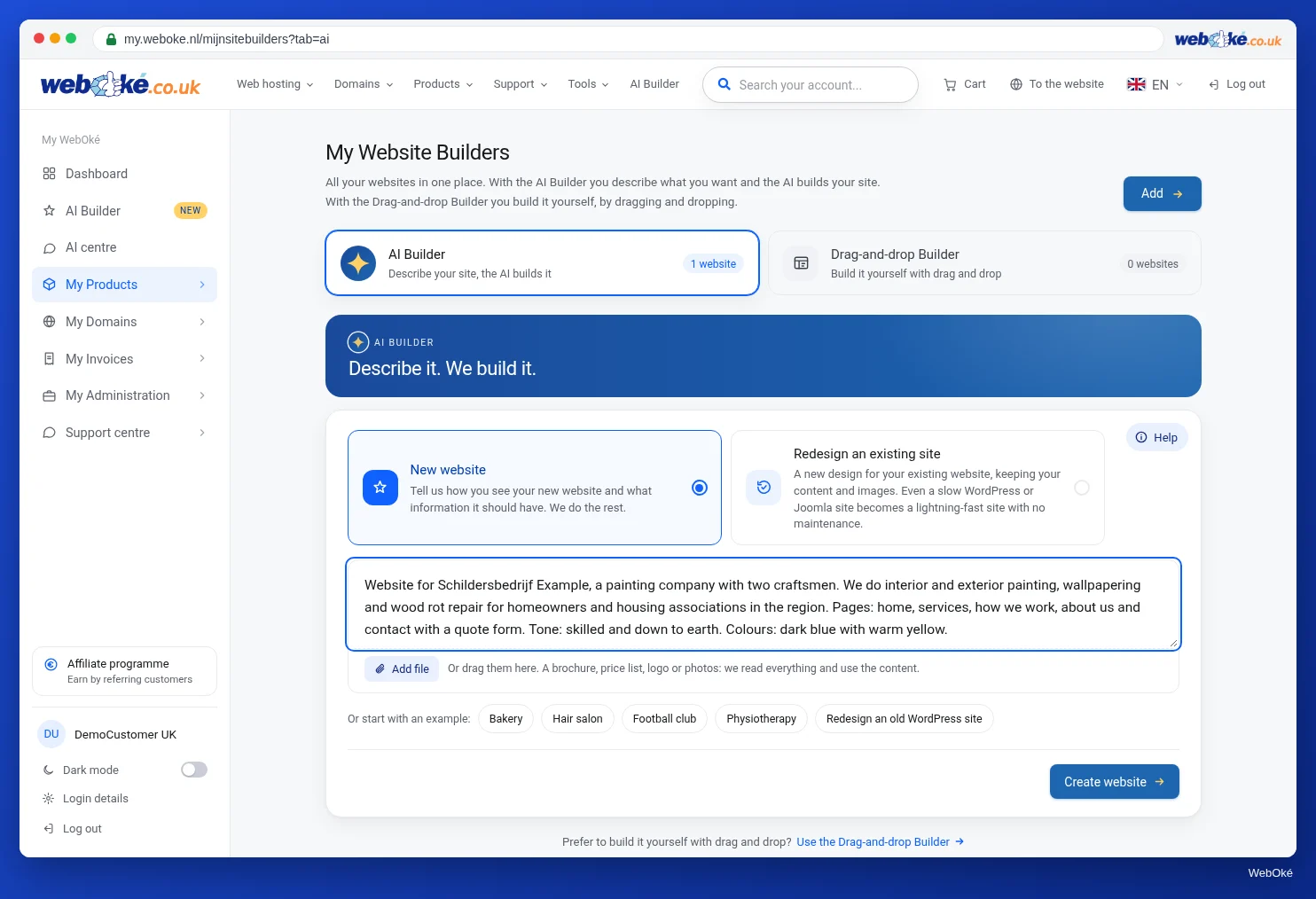
In My WebOké, open AI Builder. At the top you see the start card with the question What would you like to do? and two options:
- New website: you explain how you picture your site and what information should be on it;
- Redesign an existing site: the builder reads your current site (lesson 2.3).
Choose New website. You see the text box Describe your website, the Add file button and the Create website button. On your first visit, a short tour of the start screen begins. You can take it again later via Help.
What the builder does with your description
Your description is the instruction for the entire first version. A few things happen automatically:
- The language of your site follows the language of your description, not the language of your portal. If you write in English, your site will be in English. If you explicitly ask for another language ("make a Dutch site"), that takes priority.
- The length: at least 3 characters ("photographer" is already enough to build) and at most 4,000 characters. From 3,000 characters a counter appears. If your text is longer, put the rest in a file and send that along.
- The follow-up question: if your description is very short (fewer than 40 characters and no more than two words) and you send no file, the builder asks one short question: Where are you based and what do you offer? Your answer is added below your description. You can always choose Skip.
A weak and a strong description
Weak:
Painter in the village.
This still produces a site. But the AI does not know your name, your prices, where you work or what you want a visitor to do. So it makes up a name, fills in prices and opening hours, and leaves out your address and phone number. You then have to find and replace all of that yourself (lesson 2.4).
Strong:
Website for Schildersbedrijf Example, a painting company with two skilled painters in Voorbeelddorp. We do interior and exterior painting, wallpapering and wood rot repair for private customers and owners' associations within 25 km. Exterior painting from €45 per hour, wallpapering from €12 per m², always a free assessment first. Available Monday to Friday from 8:00 to 17:00, phone (our real number), info@example.com, Dorpsstraat 1. Above all, visitors should request a quote via the form; calling is fine too. Pages: Home, Services, How we work, About us, Contact. Address visitors informally. Colours: dark blue #1d3557 and warm yellow. Do not show reviews until we have a few of our own.
(The address and prices here are made up for this course. In your own description, use your real details, including your real phone number.)
What a good description contains
Use your preparation sheet from lesson 1.3. A good description mentions:
- The name exactly as you write it. If you do not give a name, the AI makes one up.
- What you do, for whom and where. Trade, target group, location and service area.
- Your offer with prices. Real amounts or starting prices. Without amounts, the AI fills them in. If something is free (a free assessment, a free trial lesson), say so: the AI then shows "Free" there instead of a made-up amount.
- Your contact details and hours. Address, phone, email, opening hours or when you can be reached.
- The main action. What should the visitor do? Request a quote, call, book an appointment.
- The pages, if you already know them.
- The tone and the form of address. Informal or formal, businesslike or personal.
- Your colours, in words or as a colour code. The AI uses them.
- What you do not want. "No reviews", "no animation", "no pink". The builder stores a wish like that in its memory (lesson 3.5).
Write in ordinary sentences. Lists are fine too. The AI does not need polished text from you, just the facts. It does use your own wording when it is there: a sentence that is truly yours makes a site more personal than generic marketing language.
What you had better not ask for
- Features the builder does not make: logins, a shopping cart, your own booking calendar (lesson 1.1). The builder then makes an ordinary site; plan such a feature as a widget.
- Promises you cannot keep: "available 24/7" or "on site within an hour" will appear prominently on your site. Only say it if it is true.
- Other people's data without permission, such as reviews with a customer's full name.
- Passwords or codes. They do not belong in a description.
If you want a spot that you fill in yourself later, such as a bar with your Company registration number and a quality mark, ask for it explicitly. The AI then adds short placeholders in the form "Company registration number: [fill in]". You do have to fill them in: with a placeholder like that you cannot put the site online (lesson 2.4).
Say it up front or change it afterwards
Everything in your description goes into the first build, and the very first build is free. After that, having a complete site rebuilt costs 5 edits. Making small changes afterwards via the chat costs 1 per instruction. Typing it yourself is always free. So a good description is the cheapest way to get a good site.
In the builder: how to do it
- Open AI Builder and choose New website on the start card.
- Type or paste your description in Describe your website.
- If you like, send files along with Add file (lesson 2.2).
- Click Create website. If you get the follow-up question, answer it or choose Skip.
- Next, the window opens where you choose your place and your images. We cover that in lesson 2.2.
Summary
- Your description is the instruction for the entire first version; its language becomes the language of your site.
- At least 3 and at most 4,000 characters; a very short description without a file gets one follow-up question.
- Mention your name, offer with prices, contact details, hours, main action, pages, tone, colours and what you do not want.
- What you do not mention, the AI leaves out (contact details, figures) or fills in (prices, hours, name).
- Saying it up front is free; changing it afterwards via the chat costs edits.
Quiz
Exercise
Exercise D2.1: Write your description. Write the description for your own site using your preparation sheet from lesson 1.3. Do not click Create website yet: you do that in lesson 2.2.
Checklist:
- [ ] the name of your business as you write it;
- [ ] what you do, for whom and where;
- [ ] your offer with real prices or starting prices, and what is free;
- [ ] address, phone, email and hours;
- [ ] one main action;
- [ ] pages, tone (informal or formal) and colours;
- [ ] what you do not want;
- [ ] no passwords, no promises you cannot keep;
- [ ] under 4,000 characters.
Questions:
- Paste your description.
- Which details did you leave out on purpose, and what do you expect the AI to do about them?
- What would you remove if your description gets too long?
After "done" you see a sample answer: the strong description of Schildersbedrijf Example from this lesson; reviews were left out on purpose (the AI then does not add reviews with names, but for example a statement from the business); if there is too much text, the detailed explanation per service goes into a PDF that is sent along.
Exercise D2.1: Write your description
You do this exercise yourself; no one checks it. Tick off what you've done and mark the exercise as done.
The strong description of Schildersbedrijf Example from lesson 2.1; reviews were deliberately left out (the AI then doesn't add reviews with names, but for example a statement from the business); if there's too much text, the detailed explanation per service goes into a PDF that's included.
Your ticks and notes only stay in this browser; we don't send them anywhere. If you're signed in, we only save in My courses that you've done the exercise.