
Module 1 · 1.2
English
Free site or package, and how edits work
Module 1: Before you start · Reading time: 10 minutes
Learning objective: After this lesson you can explain the difference between the free site and the AI Builder package, say what is free and what costs edits, and estimate how many edits you need.
Key concepts: free website, WebOké address, badge, noindex, AI Builder package, own domain, slot, edit, monthly bundle, welcome month, carrying over, buying extra
Two ways to start
Anyone with a free WebOké account can use the AI Builder, without entering payment details. You then choose between two slots for your site: the free website or an AI Builder package. Every site belongs to one of these slots. A draft already takes up its slot, even if it isn't online yet.
On the start screen you see your slots in the Packages and room block, and how many edits you have left in the Edits block. Use Add a package to order a package.
The free website
Every customer has one free website. It runs on a WebOké address in the form name-number.weboke.site, for example schildersbedrijf-example-123.weboke.site. You get 5 edits per calendar month; anything left over expires on the first of the month.
The free site stays online permanently, with no end date. It does have some limits:
- at the bottom there is a small badge with the text "Demo · made with the WebOké AI Builder";
- the site is not visible in search engines: every page gets the noindex instruction (search engines may read the page, but won't include it in their results);
- the contact form doesn't send anything: it is there, but greyed out;
- custom code and integrations such as Google Tag Manager and Hotjar are not included, and only widgets from well-known services work (videos, maps, calendars, reviews and appointment planners do; widgets with a form or their own script don't).
If your free slot is already taken, the builder tells you when you build ("Your free website is already in use"). If you want a new free site, first delete the old one or move it into a package.
What is the free site good for? Getting to know the builder, following this course (almost all exercises work on the free address) and showing a site to a colleague or client. A real business site that gets found and receives enquiries needs a package.
The AI Builder package
The AI Builder package is a web hosting package for one website on your own domain. It includes:
- email on your domain (mailboxes in the package);
- 20 GB of storage for your site and email;
- 50 edits per month, and 100 in the first month (the building month is the busy one; the builder calls it your welcome month);
- a working contact form, no badge, and visibility in search engines.
One package is one website. If you want a second site on its own domain, you take a second package. Two packages also give you two monthly bundles; your balance applies to all your websites.
In your product overview and on invoices the package may be called AI Bouwer; in the builder and on the website it is called AI Builder. It is the same product.
You pay for the domain name itself (registration or transfer) separately. If you already have a regular hosting package with one domain, you can convert it at the bottom of the start screen with Switch to AI Builder. Your domain, email and current website stay as they are until you publish the new site.
For the current price, see the product page: https://www.weboke.nl/en/ai-website-builder. Prices exclude VAT.
What is an edit?
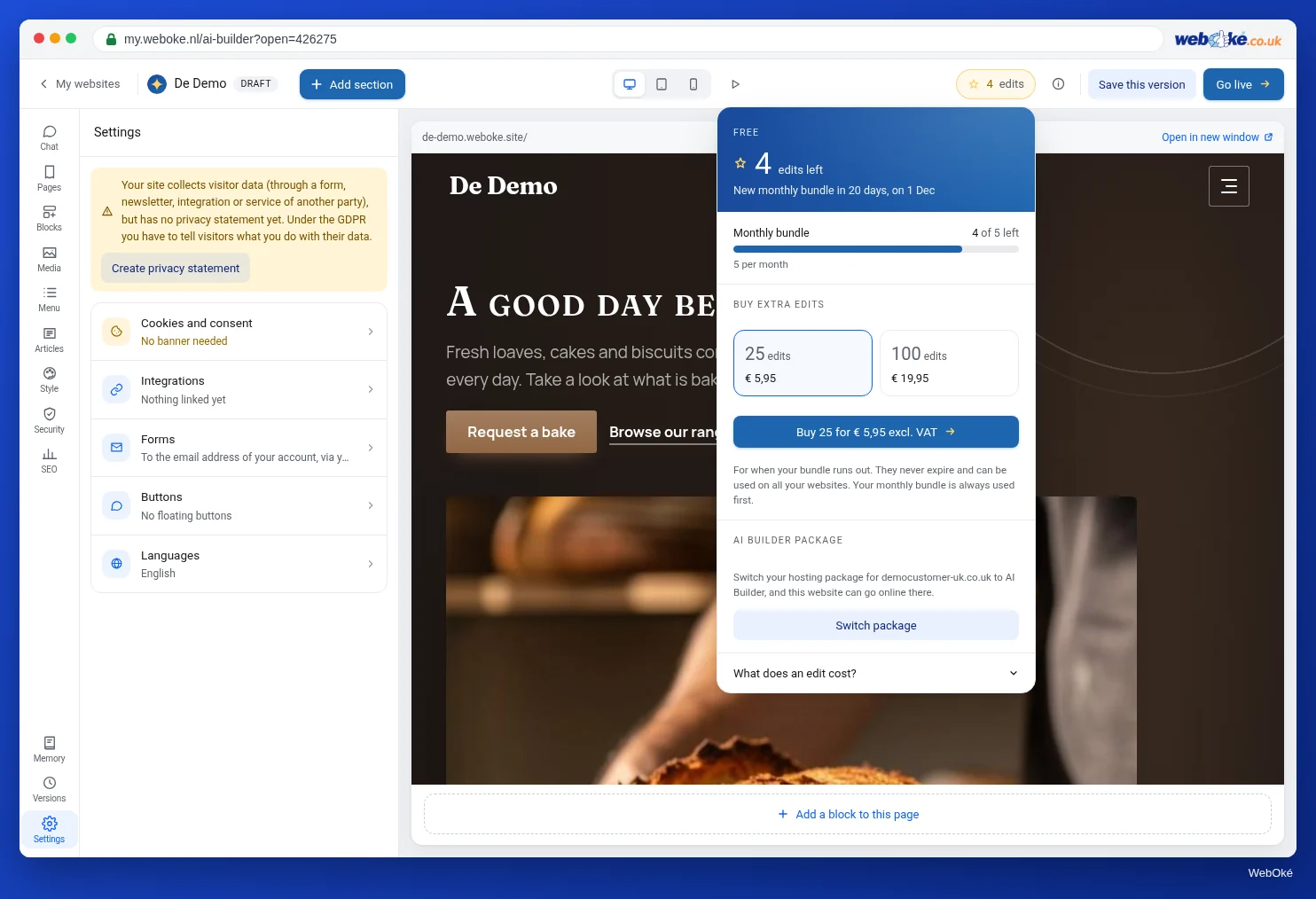
An edit is one instruction to the AI. The builder always shows in advance what something costs: below the text box in the chat, and in the window behind the pill with your edits in the top bar.
| Free | Costs edits |
|---|---|
| Asking questions in the chat | An instruction to the AI: 1 |
| Editing text yourself | An instruction that adds a new section or page: 2 (per instruction, not per page) |
| Choosing or uploading photos | Having a photo created: 1 (two suggestions) |
| Changing your house style | Having a logo designed: 1 (three suggestions) |
| Adding sections with the picker, moving them, removing them with the buttons | Having a post written: 1 (summarising is free) |
| Restoring versions, also via the chat ("undo that") | Having SEO texts written: 1 |
| Managing pages and the menu, writing posts | Translating your site: 2 per language |
| Going live | Building a complete site: free the very first time, then 5 |
Two rules make it fairer. If something fails or can't be done, you don't pay. And a suggestion you discard doesn't count: you get the edits back, up to 10 times a day. After that, discarding does count for the rest of that day.
Carrying over and buying extra
Your balance consists of three pots, used up in this order:
- this month's bundle (with a package, the month runs from the start date of your subscription);
- what you carried over from last month: at most half of your monthly bundle carries over, for one month only, so with the package at most 25;
- edits you bought extra, in bundles of 25 or 100. These don't expire and apply to all your websites.
You can buy extra edits via the pill in the top bar or the block on the start screen, even without a package. You receive an invoice; the edits are added as soon as it has been paid. If you run out of edits, everything that is free keeps working: editing text yourself, house style, going live.
A worked example
Schildersbedrijf Example takes the package. In the first month it has 100 edits. Its first build is free. After that it gives twenty chat instructions (20), adds two new pages via the chat (2 x 2 = 4), has a logo designed (1) and three photos created (3), and has the SEO texts written (1). That makes 29 in total. It discards four suggestions; those don't count. All the text it corrects itself costs nothing.
Of the 100, it has 71 left. Of those, 25 carry over to the second month: half of the regular monthly bundle of 50 is the ceiling. The rest expires. So in the second month it has 50 new edits plus 25 carried over. Whatever it doesn't use of those 25 expires at the end of that month: carrying over never goes back more than one month, so you can't save edits up.
In the builder: checking your balance
- Open the builder and click the pill with your edits in the top bar.
- Read This month, Carried over from last month, Already used and Bought extra, and the date on which you get new ones.
- Expand What does an edit cost?.
- Type an instruction in the chat without sending it: below the text box you see what it costs.
Summary
- Every customer has one free website on weboke.site with 5 edits per calendar month; it stays online, with a badge, noindex, a form that sends nothing and only well-known widgets.
- The AI Builder package is one website on your own domain, with email, 20 GB and 50 edits per month (100 in the first month).
- Editing yourself, house style, asking questions and going live are free; an instruction to the AI costs 1, or 2 if a section or page is added.
- Discarded suggestions and failed instructions cost nothing; up to 25 edits carry over to the next month.
- Extra bundles of 25 or 100 don't expire and are used up last.
Quiz
Exercise
Exercise D1.2: Your own situation and budget for edits. Decide whether you start with the free site or a package, and estimate your edits.
Checklist:
- [ ] you have looked at the pill with your edits or the Edits block in the builder;
- [ ] you have checked in Packages and room which slots you have;
- [ ] you have expanded and read What does an edit cost?;
- [ ] you have made a list of what you want the AI to do in your first month;
- [ ] you have checked the current price on the product page.
Questions:
- Are you starting free or with a package, and why?
- How many edits do you expect to need in your first month? Show your calculation.
- Which three things will you do yourself, so they cost nothing?
After "done" you see an example answer: Schildersbedrijf Example starts with a package because it wants to receive quote requests by email and wants to be found; estimate for the first month about 30 (20 instructions, 2 pages at 2, logo 1, photos 3, SEO 1), well within the 100; it does text corrections, the house style and going live itself.
Exercise D1.2: Your own situation and budget for edits
You do this exercise yourself; no one checks it. Tick off what you've done and mark the exercise as done.
Schildersbedrijf Example starts with a package because it wants to receive quote requests by email and be found online; estimate for the first month about 30 (20 instructions, 2 pages of 2, logo 1, photos 3, SEO 1), well within the 100; the owner does the text corrections, the house style and publishing himself.
Your ticks and notes only stay in this browser; we don't send them anywhere. If you're signed in, we only save in My courses that you've done the exercise.
Further reading
- The AI Builder: package and current prices (product page): https://www.weboke.nl/en/ai-website-builder
- Sitebuilder and AI Builder: which one should you choose and how do you open it?
- Which hosting package is right for me?
- Cancelling products and domains, withdrawing a cancellation, and what happens next