
Chapter 4 · 4.1
Writing a new message
Here's how to write and send a new message.
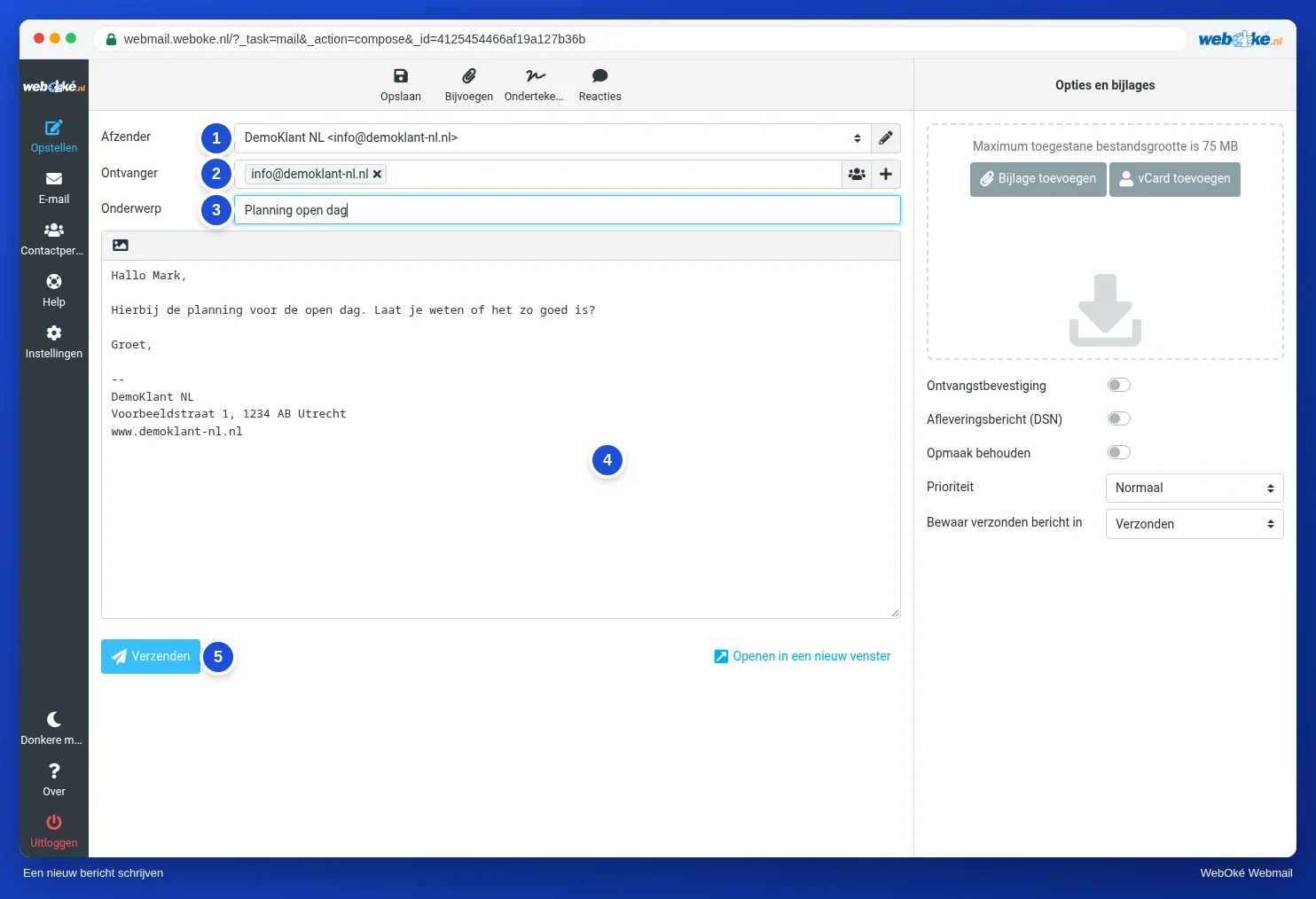
- Click Compose in the menu at the top left.
- Check the From field (1). If you have more than one identity, choose here which one you want to send from. See Your name as the sender.
- Type the email address in the Recipient field (2). If the person is in your address book, the webmail completes the address as you type. Separate multiple recipients with a comma.
- Fill in the Subject (3).
- Write your message (4). If you have set up a signature, it already appears below your text (see Creating a signature).
- Click Send (5).
You can find a sent message in the Sent folder.
Cc and Bcc
Click the plus sign to the right of the Recipient field. You can then add Cc, Bcc, Reply-To and Followup-To.
- Cc: someone receives a copy and everyone can see that.
- Bcc: someone receives a copy, but the other recipients can't see that. Use Bcc when you send one message to many people who don't need to see each other's addresses.
Use the button with the people icon next to the plus sign to choose recipients from your address book.
Please note: you can only send a limited number of emails per day. This limit applies to your entire package combined. For a newsletter, you're better off using a newsletter service. See The daily limit has been reached.