
Module 3 · 3.3
English
Attachments and large files
Module 3: Writing email · Reading time: 11 minutes
Learning objective: After this lesson you can work out whether files fit in one email, you understand why an attachment gets bigger when you send it, and you choose the right route for large files: shrink them, convert them or use a share link.
Key concepts: MIME, base64, message size limit, maximum attachment size, receiving server, share link, expiry date, PDF, resizing photos, attachment reminder, vCard
An attachment has become text
Email was originally designed for plain text. A photo, a PDF or a spreadsheet consists of arbitrary bytes, and those can't simply be sent along. That's why MIME exists: a standard that splits a message into parts, each with a header saying what it is (for example Content-Type: application/pdf) and how it's packed. For files, that packing is almost always base64.
Base64 turns every 3 bytes of your file into 4 readable characters (RFC 2045). The result is therefore about a third larger than the original. A 3 MB photo takes up about 4 MB in the email. This is what the start of such an attachment looks like when you view the source of a message:
Content-Type: application/pdf; name="offerte-bruiloft.pdf"
Content-Disposition: attachment; filename="offerte-bruiloft.pdf"
Content-Transfer-Encoding: base64

JVBERi0xLjcKJcfsj6IKNSAwIG9iago8PC9MZW5ndGggNiAwIFIvRmlsdGVyIC9GbGF0ZURl
Y29kZT4+CnN0cmVhbQp4nO1dW4/bNhJ+968wFigQoGBMhfVL6UNBRoqnSuUMIqI3Lff1Uq...
Every line of that jumble is a piece of your PDF. The recipient sees none of it: their email program turns it back into the original file.
Doing the maths: does it fit in one message?
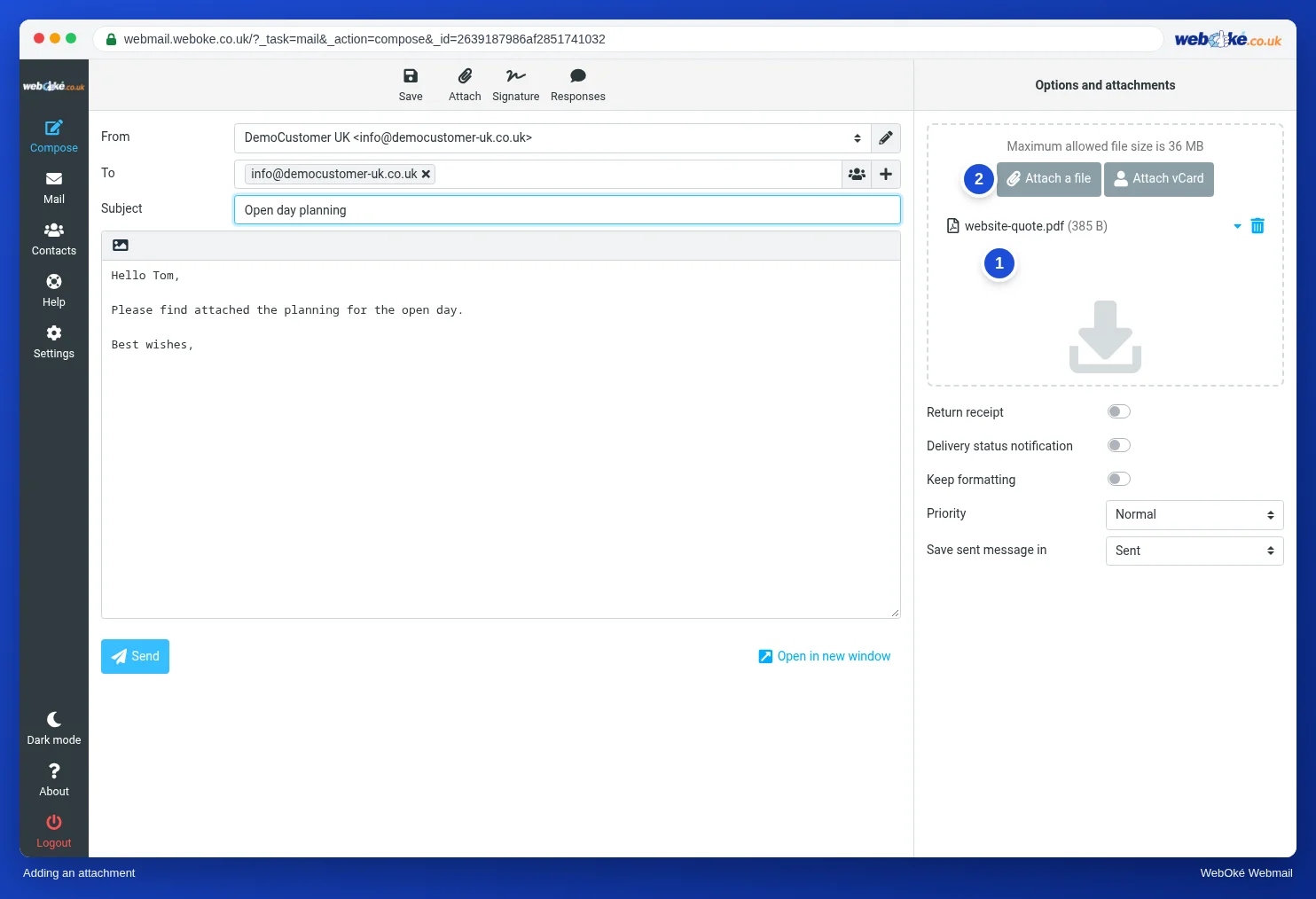
Every mail server has a message size limit: the largest message it accepts, measured after packing. At WebOké that's 50 MB per message, on all mail servers. Because base64 makes everything a third larger, about 36 MB of attachments fits in one message. You'll also see that figure in the webmail as the maximum file size when adding attachments.
The rule of thumb for working it out yourself:
- Add up the size of all attachments.
- If that's more than about 36 MB, it won't fit in one email at WebOké.
- If it's less, it fits on your server. But that's only half the story.
The other half is the receiving server. It has a message size limit too, and it's often lower than 50 MB. Many services accept messages up to about 20 to 25 MB, but that varies per service and can change. If your message is too big for the recipient, you get an error message back, often with a code like 552 or the words "message too big" or "message size exceeds". Your email was sent, but it didn't arrive.
So here's a second, more cautious rule of thumb: above 15 to 20 MB of attachments for someone outside your own organisation, you're better off choosing a share link. Then you don't have to guess.
Also bear in mind: a message with large attachments will end up in your Sent folder and in the recipient's mailbox. It counts towards storage for both of you (lesson 5.4). If you send the same 20 MB file to five people, it's stored five times with the recipients and once with you.
Making it smaller: the biggest gain first
Before you create a share link, check whether the file can be made smaller. Not all files are equally large for what they contain.
- Photos from a phone or camera are often several MB each, because they're saved at full resolution. For a screen, a fraction of that is enough. Resizing a photo to, say, 2000 pixels wide usually makes it many times smaller, without any visible difference on a screen. This is almost always the biggest gain.
- Documents: a quote as a .docx can be large because of inserted images, and sometimes looks different for the recipient. A PDF is often smaller, looks the same everywhere and can't be changed by accident.
- Scanned documents are images. Scan at a lower resolution or in black and white if colour isn't needed.
- Zipping helps with text files and spreadsheets, but hardly at all with photos, video and PDFs: those are already compressed.
With video, making it smaller often isn't enough. A clip of a few minutes is easily larger than 36 MB. Then a share link is the only good route.
The share link: the file stays put, the link travels
With a share link you put the file in online storage, such as Nextcloud or another cloud, and send only a link. The email stays small, the recipient downloads the file whenever they like, and you can revoke the link later.
A good share link has:
- an expiry date, so the file doesn't stay public for years;
- a password for confidential files, which you pass on through another channel (text message or phone), not in the same email;
- read-only access, unless the other person really needs to upload something.
One pitfall: a share link without a password works for anyone who has the link. If the recipient forwards your email, the next recipient can also get to the file. For personal data or quotes, a password and an expiry date are therefore no luxury.
Another pitfall: some recipients don't trust links, and rightly so after all the phishing (lesson 2.4). So say in the email what they can expect: "You'll get a link to our Nextcloud, the file is called foto's-bruiloft.zip and the link works until 1 June."
Forgotten attachments and a business card
Who has never written "see attachment" and then not added anything? The webmail can warn you: with Remind about forgotten attachments it checks when you click Send whether your text contains words like "attachment" while there's no attachment. This reminder is off by default; you turn it on under Settings > Composing Messages.
With Attach vCard you send a contact from your address book along as a business card (a .vcf file). The recipient adds it to their own address book with one click. Handy when you want to give someone the details of a colleague or supplier. More about vCard in lesson 7.2.
In practice: how it works in the webmail
In the Compose screen you add an attachment with Attach at the top or with Attach a file on the right, or you drag a file into the box on the right. That's also where you see the maximum file size. The reminder for forgotten attachments is under Settings > Composing Messages. The Roundcube manual describes the steps. Other webmail works in a similar way, but the limit per message differs per provider.
Summary
- Attachments are packed as text with base64 and therefore become about a third larger (3 bytes become 4 characters).
- At WebOké a message may be 50 MB; that's about 36 MB of attachments.
- Receiving servers often accept less; for large files going outside your organisation, a share link is the safer choice.
- First resize photos and convert documents to PDF; zipping doesn't help with photos and video.
- A share link gets an expiry date and, for confidential files, a password sent through another channel.
Quiz
Exercise
Exercise A3.3: Does it fit in one email? Use the rule of thumb at WebOké: about 36 MB of attachments fits in one 50 MB message, because base64 makes everything about a third larger. For situations 1 to 3, choose "fits" or "does not fit, share link". (1) Sanne sends Ahmed two PDFs: the 3 MB quote and the 5 MB flower plan. (2) Daan wants to send Sanne a video of building a wedding arch; the file is 120 MB. (3) Sanne wants to send Ahmed twelve photos of previous bridal bouquets, 3.5 MB each, straight from her camera, in one email. Question 4: Sanne needs to make room for another email and can resize one file first. Which file do you choose: (a) offerte-bruiloft.pdf of 0.4 MB, (b) bruidsboeket.jpg of 9 MB straight from the camera, (c) prijslijst.docx of 0.2 MB? The program compares your four answers with the key and shows the calculation for each situation.
Further reading
Where steps in the webmail are given, they apply to the WebOké webmail; other webmail works in a similar way.
- Roundcube Webmail 4.3: Sending attachments
- Email rejected: message too big
- Error messages solved 1.6: 552 Mailbox full or message too big
- Free course Email in order: setting up and making sure it arrives properly 3.2: Storage, quotas and a full mailbox
- RFC 2045, MIME part 1, section 6.8 on base64: https://www.rfc-editor.org/rfc/rfc2045