
Module 3 · 3.2
English
An email that gets read
Module 3: Writing email · Reading time: 11 minutes
Learning objective: After this lesson you can write an email that is understood quickly: with a subject that says what needs to happen, the question at the top, a tidy structure, a quote that helps and a deliberate choice between plain text and formatting.
Key concepts: subject line, key sentence, one topic per email, quoting, below or above the quote, plain text, HTML editor, multipart/alternative, tone, Return receipt
Readers scan first
People who open their email don't read from top to bottom. They see a name and a subject in the message list, maybe open the message, read the first few lines and then decide: do it now, do it later or leave it. A good email is written for those few seconds. That isn't about beautiful sentences but about order: the most important thing first.
Two things decide whether your email survives that first glance: the subject and the first sentence.
The subject: a summary with an action
The subject line is the only thing the recipient sees before opening, and the only thing they'll search on later. "Quick question", "Info" or "Re: Re: Fwd: quote" say nothing. A good subject answers two questions: what is it about, and what do you expect?
- Bad:
vraagje - Better:
Bruiloft 14 juni: kleuren en aantal tafels - Best:
Bruiloft 14 juni: graag kleuren en aantal tafels voor 1 mei
The last subject contains a date and an action. Without opening it, Ahmed knows he has to decide something, and by when. Six months later, Sanne finds the email again by searching for "bruiloft" (wedding) or "tafels" (tables) (lesson 5.3).
If the conversation changes topic, change the subject line too. A thread called "Quote" that is now about a complaint is impossible to find.
The first sentence is the question
Start with what matters: the question, the decision or the news. Background comes after that. This is also called the key sentence. Compare "I hope all is well, it's very busy here with Mother's Day, Daan was on holiday and I had another look at the quote..." with "Ahmed, could you let me know two things before 1 May: the colours and the number of tables?" Ahmed can answer the second version in one go. A friendly introduction is fine, but don't put it before the question.
A few rules that help:
- One topic per email. Two topics in one email often means the second one gets forgotten. Also, you can't file the email in one folder or forward it to the right person.
- Short paragraphs, with a blank line between them. Nobody reads a block of fifteen lines on a phone.
- Several questions? Number them. Then the recipient can reply with "1. pastel, 2. fourteen tables".
- Give a date if you need something, and say why ("then I can order from the grower in time").
- End with the next step, not with three exclamation marks.
Quoting: only what helps
When you reply to an email, the webmail puts the original message in your reply as a quote, with a > before each line in plain text or a vertical line with formatting. That quote is useful: the recipient sees what you are responding to. But in a long thread the quote grows with every round, until your two-line reply disappears under four screens of text.
So remove what isn't needed. Keep only the sentence you are responding to and put your answer below it. This is called replying inline:
> Wil je wit met roze of toch meer pastel?
Pastel graag, met wat lichtgroen.

> Hoeveel tafels waren het?
Veertien.
Whether you start above or below the quote is a matter of convention. In business email, writing above the quote has become normal, because the newest text is at the top. On technical mailing lists, below or between the lines is the norm. Choose what suits the people you email with, and be consistent. The webmail lets you choose under Settings > Composing Messages > When replying.
A pitfall: a quoted thread sometimes contains things the new recipient doesn't need to read, such as an internal comment or a phone number. Read through the quote before you add someone or forward the email.
Plain text or formatting?
An email can be written in two ways.
- Plain text: letters only, no bold, colours or pictures in the text. Arrives the same everywhere, is small and reads well on any screen, including a simple mail app or a screen reader.
- HTML (formatting): with bold, headings, colours, links behind words and images. A mail program that sends formatting usually also sends a plain text version in the same message. This is called multipart/alternative: the recipient gets the version their program can display best.
Formatting makes sense when it helps the content: a table with times, a heading above each section, a deadline in bold. It makes no sense when it is just decoration: coloured letters, a background or five fonts. Formatting can also get lost or arrive differently, for example if the recipient only reads plain text. So never put the meaning in a colour alone ("the red dates are full").
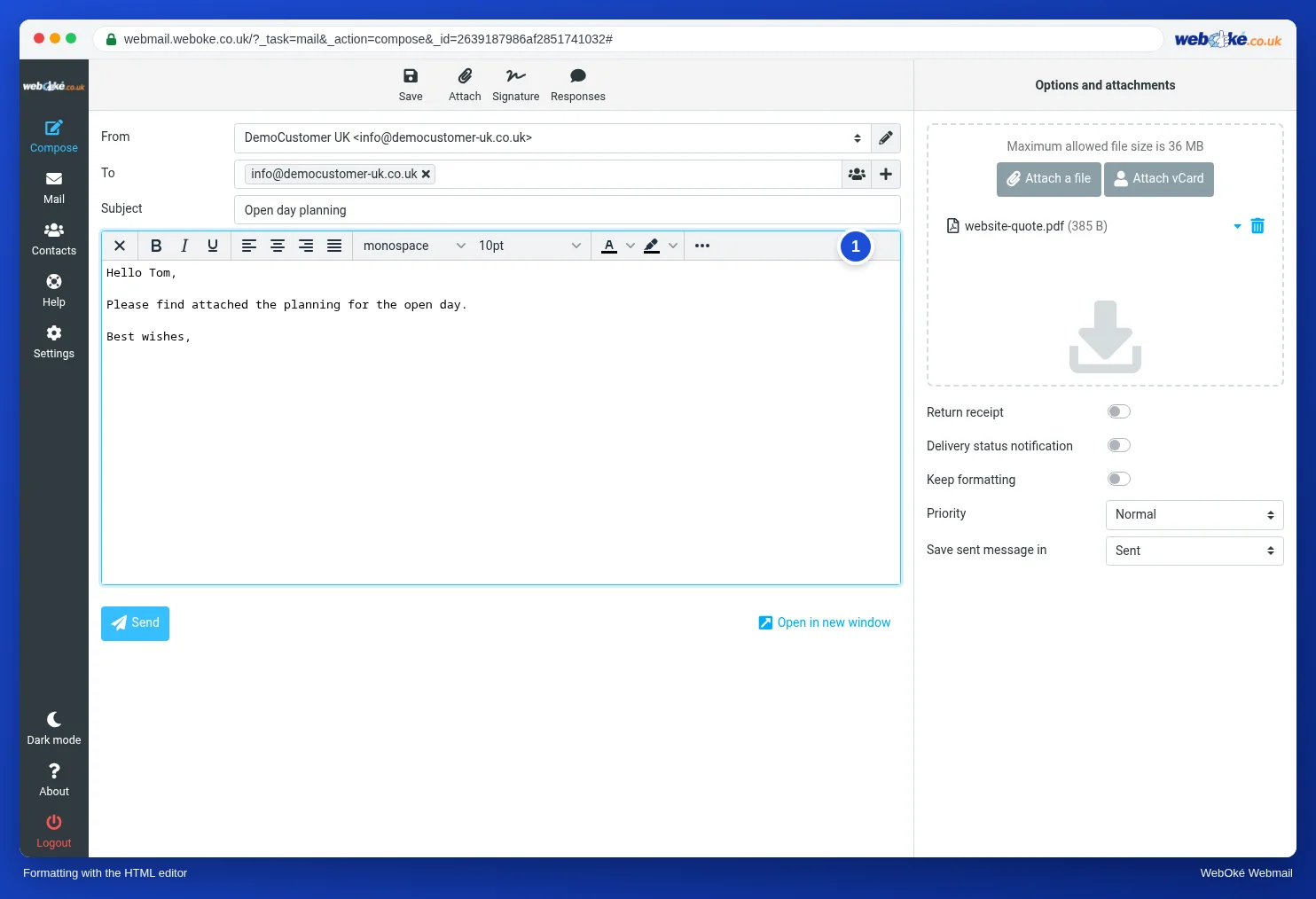
In the WebOké webmail you write in plain text by default. You switch on the HTML editor per message with the button with the picture at the top left of the text box, or by default under Settings > Composing Messages.
Tone, proofreading and the Return receipt
Email lacks your voice and your face. A short sentence you mean to be efficient can come across as blunt. A few rules of thumb: say hello and sign off, write "could you" instead of "you must", never write anything you wouldn't also say out loud to the recipient, and wait before sending if you are angry. Leaving a draft for an hour and rereading it (lesson 3.4) prevents a lot of regret.
Before you click Send, check once more: is the recipient right, is the subject right, is the question at the top, is the attachment included (lesson 3.3)?
With the Return receipt option you ask the recipient to let you know they have opened your email. Use it sparingly. The recipient sees a prompt, may refuse, and many programs never send a receipt. So no receipt tells you nothing. Asking for a receipt with every email also comes across as distrustful. If you want to be sure something has arrived, simply ask in the text.
In practice: how it works in the webmail
You choose above or below the quote under Settings > Composing Messages. That is also where you set whether you write with formatting by default. You switch on the HTML editor per message with the button with the picture. You'll find the Return receipt among the options on the right of the Compose screen. The Roundcube manual describes the buttons step by step. In other webmail and in mail programs the options have similar names, and the writing rules apply everywhere.
Summary
- Write for the first glance: the subject and first sentence decide whether your email gets read.
- A good subject says what it is about and what you expect, preferably with a date.
- One topic per email, short paragraphs, numbered questions and a clear next step.
- Quote only what helps; choose above or below the quote and stick with it.
- Use formatting only when it helps the content; ask for a Return receipt only as an exception.
Quiz
Exercise
Exercise D3.2: Rewrite a messy email. Open the material slechte-mail.txt: an email from Sanne to Ahmed with the subject "vraagje" (quick question), in which four topics are mixed up and the real question only comes at the end. Rewrite it in the webmail as a new message to yourself (don't send it to anyone else). Use this checklist: the subject says what it is about, what needs to happen and by when; the first sentence is the question; the questions are numbered; things that don't belong to this topic have been removed (or put in a separate email); only the person who needs to reply is in To; the email is shorter than the original. Then answer: which sentence in the original was really the key point, what did you leave out and why, and does Daan belong in To, Cc or not at all? Finally, compare your work with the model answer for this exercise.
Exercise D3.2: Rewrite a messy email
You do this exercise yourself; no one checks it. Tick off what you've done and mark the exercise as done.
File for this exercise: slechte-mail.txt
Subject: Wedding 14 June: colours and number of tables needed by 1 May
Hi Ahmed,
Could you let me know two things by 1 May? Then I can order the flowers from the grower in time.
1. Which colours would you like: white with pink, or pastel?
2. How many tables will there be: 12 or 14?
Also: our delivery driver can't come before 10 o'clock on Saturday. Let me know if that's a problem.
The bridesmaids' bouquets were charged twice in the quote. You'll receive a corrected quote this week.
Best wishes,
Sanne
The key point was the last sentence of the original (if I know by 1 May at the latest). The Mother's Day rush, Daan's holiday and the new vases don't belong with this question. Daan doesn't belong in To: Ahmed is the one who has to reply.
Your ticks and notes only stay in this browser; we don't send them anywhere. If you're signed in, we only save in My courses that you've done the exercise.
Further reading
Where steps in the webmail are given, they apply to the WebOké webmail; other webmail works in a similar way.