
Part 2 · 2.4
ERR_SSL and other certificate errors in the browser
Does your browser show a message about the secure connection instead of your website? Then https isn't working properly for this address. At WebOké every domain gets a free Let's Encrypt certificate that renews automatically, but only if your domain points to our server.
What the message looks like
| Message in the browser | What does it usually mean? |
|---|---|
| NET::ERR_CERT_COMMON_NAME_INVALID, or a certificate in the name of the server (such as linux2023.webawere.nl) | The name you're opening isn't in the certificate. For example www, a subdomain or a domain pointer without its own certificate. |
| NET::ERR_CERT_DATE_INVALID, certificate expired | The certificate wasn't renewed in time, because Let's Encrypt couldn't verify your domain. |
| ERR_SSL_PROTOCOL_ERROR or another message containing ERR_SSL | No proper secure connection can be set up for this address. Often because there's no certificate for the name yet, or because the domain points to a different server. |
| Not secure, even though the certificate works | Mixed content: the page still loads some items via http://. See No padlock or 'not secure': fixing mixed content. |
The causes on our side
- Your domain doesn't point to us (yet), for example just after a migration. Also check the AAAA record (IPv6): if it still points to another server, the check fails.
- You're using the Cloudflare proxy (orange cloud).
- There's a CAA record without letsencrypt.org.
- A rule in .htaccess, a plugin or a protected directory is blocking the folder /.well-known/acme-challenge/.
- You once uploaded your own certificate that has now expired.
How to fix it
- Use Domain health to check whether your domain points to us.
- In DirectAdmin, open SSL/TLS Certificates. At the bottom, under Failed HTTP checks, you can see which names the check fails for.
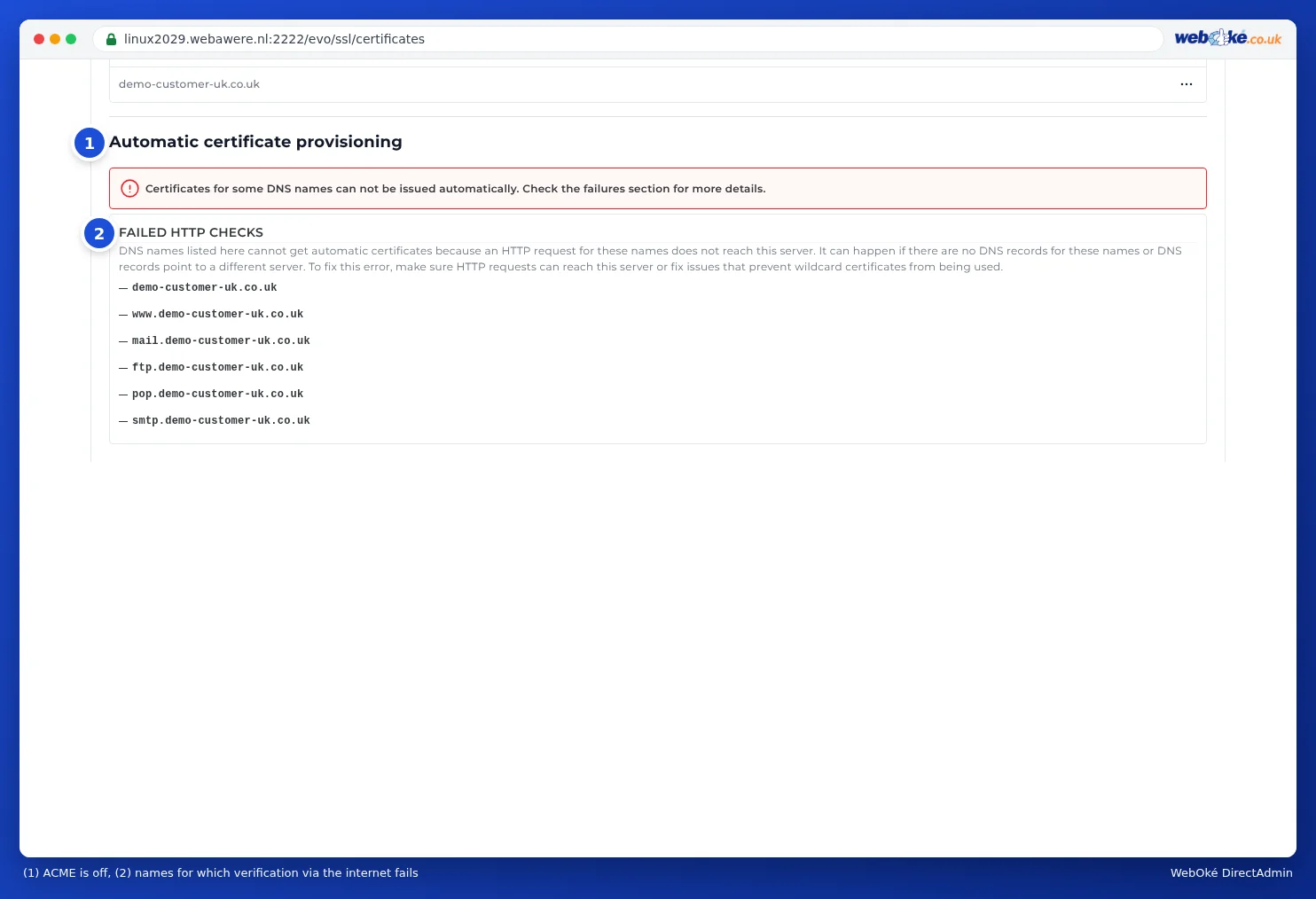
(1) ACME is disabled, (2) names for which the check fails - Fix the cause: correct the DNS or AAAA record, temporarily switch off the Cloudflare proxy, add to the CAA record or remove the block on .well-known.
- Then, under Automatic certificate provisioning, click Provision now. Don't keep clicking: after many failed attempts, Let's Encrypt blocks your domain for anywhere from an hour to a day.
- Is the https redirect switched on while there's no certificate yet? Switch it off for the time being.
Please note: Does your browser show a certificate error with no button to continue anyway? Then your browser has remembered HSTS for your site. You can't skip that message: first make sure you have a working certificate.
When should you contact us?
Does your domain point to us, is there nothing listed under Failed HTTP checks and does the message still appear? Then get in touch.
Ask the AI assistant in My WebOké first, or create a ticket via Support centre and then Submit a ticket. Include:
- your domain name
- a screenshot of the message in the browser
- what is shown under Failed HTTP checks
Never send your password.
Detailed explanation: Activating, renewing and troubleshooting an SSL certificate and Let's Encrypt not working: causes and solutions.