
Part 3 · 3.2
Nextcloud: Redis server went away
The message Redis server went away means that a program has lost its connection to Redis. Redis is a fast memory store that Nextcloud and websites use to keep things temporarily. What you do depends on where you see the message.
In your WebOké Nextcloud
You might see it when saving an appointment fails with Failed to save event, when the calendar app on your phone returns an HTTP 500, and when the error details say Redis server went away.
With a WebOké Nextcloud, we manage the server, and therefore Redis too. You can't fix this yourself. It's also not caused by your phone or the app you use: if you see the same error in the browser, the problem is on the server. It can also be caused by a bug in a Nextcloud app.
- Check Outages & maintenance to see if anything is going on.
- Try again in the browser after a few minutes.
- Does the error persist? Get in touch with us (see below).
On your own website (WordPress)
If your website uses Redis, for example as an object cache in the LiteSpeed Cache plugin, the message may appear in your error log or on your site. With us, Redis runs per DirectAdmin user, without a port and without a password. It's available with Power Webhost Three, Power Webhost Four and Reseller; WebHost One and Two don't include Redis.
- In DirectAdmin, open Redis. If it says Redis is disabled, click ENABLE (1).
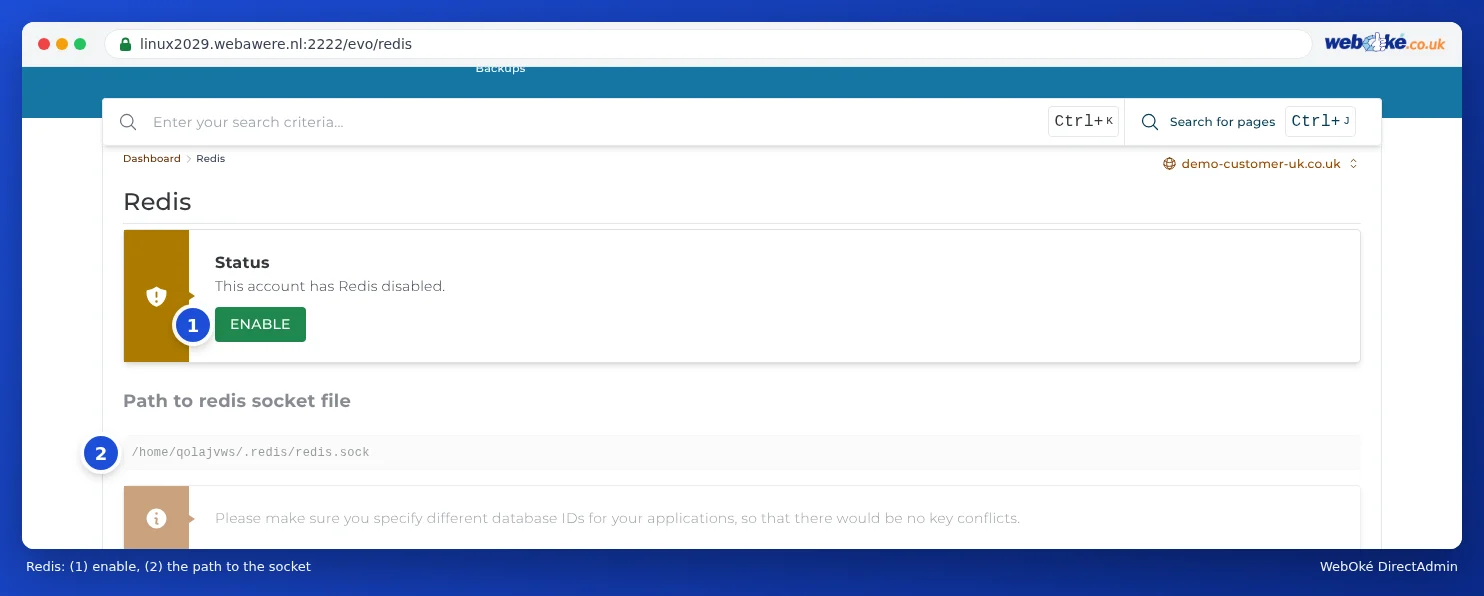
Redis: (1) enable, (2) the path to the socket - Copy the Path to redis socket file (2), such as /home/username/.redis/redis.sock.
- In LiteSpeed Cache, go to Cache, tab Object, method Redis. Enter that socket path as the host and 0 as the port, and leave the username and password empty.
- Has your site stopped working and you can't sort it out? Turn off the object cache in the plugin. Your site will then work without Redis.
When should you contact us?
With a WebOké Nextcloud, always if the error persists. With your website, if Redis is enabled, the socket path is correct and the message persists.
Ask the AI assistant in My WebOké first, or create a ticket via Support centre and then Submit a ticket. Include:
- where you see the message (Nextcloud in the browser, the calendar app, or your website)
- the time it went wrong
- the address of your Nextcloud or website
- a screenshot of the message
Never send your password.