
Module 7 · 7.3
The technical health of your domain
Module 7: Keeping your domain safe and healthy · Reading time: 8 minutes
Learning objective: After this lesson you can check whether your domain's nameservers, DNSSEC and records pointing to your website are in order, and you know how to keep an eye on them.
Key concepts: nameservers at the registry, zone, expired nameservers, DNSSEC chain, bare name and www, Domain health, monitoring
Healthy registration is not the same as a healthy domain
The previous modules were about registration: who the registrant is, whether the name gets renewed, whether it is secure. But a domain that is properly registered and paid for can still fail to work. In that case the problem lies in the technology around it.
This lesson walks through the four points that belong to the name itself: the nameservers at the registry, the nameservers themselves, DNSSEC and the records pointing to your website. The DNS course goes into much more depth on these. Here you mainly see what you need to check as the registrant, and where to read more.
Nameservers at the registry and the zone
At the registry, your domain has a short list of nameservers. That is where the rest of the internet goes to look up your records. Those nameservers hold the zone: the records themselves, such as the A record for your website and the MX record for your email.
The two must match. If the registry lists the nameservers of provider A, but you entered your records at provider B, nobody will see those records. This often happens after a transfer or after cancelling a hosting plan. You can read how to change nameservers in the DNS course, lesson 2.3: https://www.weboke.nl/en/dns-cursus/nameservers-wijzigen-en-glue-records
Two rules apply almost everywhere: you need at least two nameservers, and they must all answer for your domain. A nameserver that does not (or no longer) answer makes your domain slow or unreachable.
Nameservers are domain names too
A nameserver is called something like ns1.provider.example. That is itself a name under a domain, with its own registrant and its own expiry date. If the company behind those nameservers stops, or the domain they fall under expires, your domain stops too. In the worst case someone else registers that domain and then decides what answers your domain gives.
So check every now and then:
- whether your nameservers belong to a provider you are still a customer of;
- whether, after cancelling a plan or service, you no longer use nameservers from that old provider;
- whether your own nameservers (if you have them) fall under a domain you monitor carefully yourself.
DNSSEC in brief
With DNSSEC, the answers from your nameservers are signed. Your registrar places a DS record at the registry: a fingerprint of your key. That way anyone can check whether an answer really comes from your nameservers. This is called the chain: the registry points to your key, and your key signs your records.
That chain has to be correct. If the DS record at the registry no longer matches the keys on your nameservers, resolvers that check DNSSEC will reject your answers. For a large share of your visitors, your domain then does not work at all. This mainly happens after transferring your domain or your DNS (lesson 6.2) and during a key rollover. So a broken chain is worse than no DNSSEC at all.
How the chain works exactly and how to check it is explained in the DNS course, lesson 8.1: https://www.weboke.nl/en/dns-cursus/dnssec-in-gewone-taal
The bare name and www
The last point is the most visible: can a visitor reach your website both through the bare name and through www? Each needs its own record. If one is missing, the site does not work for some of your visitors, even if everything else is fine. The DNS course explains how to set this up properly.
Check once or keep monitoring
You can check all of this yourself with online tools. Which tool to use for which question is covered in the DNS course, lesson 8.3: https://www.weboke.nl/en/dns-cursus/online-dns-tools
If you want to go through the whole domain from top to bottom, including email, use the checklist from lesson 8.5: https://www.weboke.nl/en/dns-cursus/checklist-voor-je-eigen-domein
Checking once is good, but problems tend to appear later: a cancelled service, a forgotten key rollover, a nameserver that shuts down. So have your domain monitored as well. A monitoring service regularly checks whether your domain and website are working and warns you when something changes.
In practice: how it works at WebOké
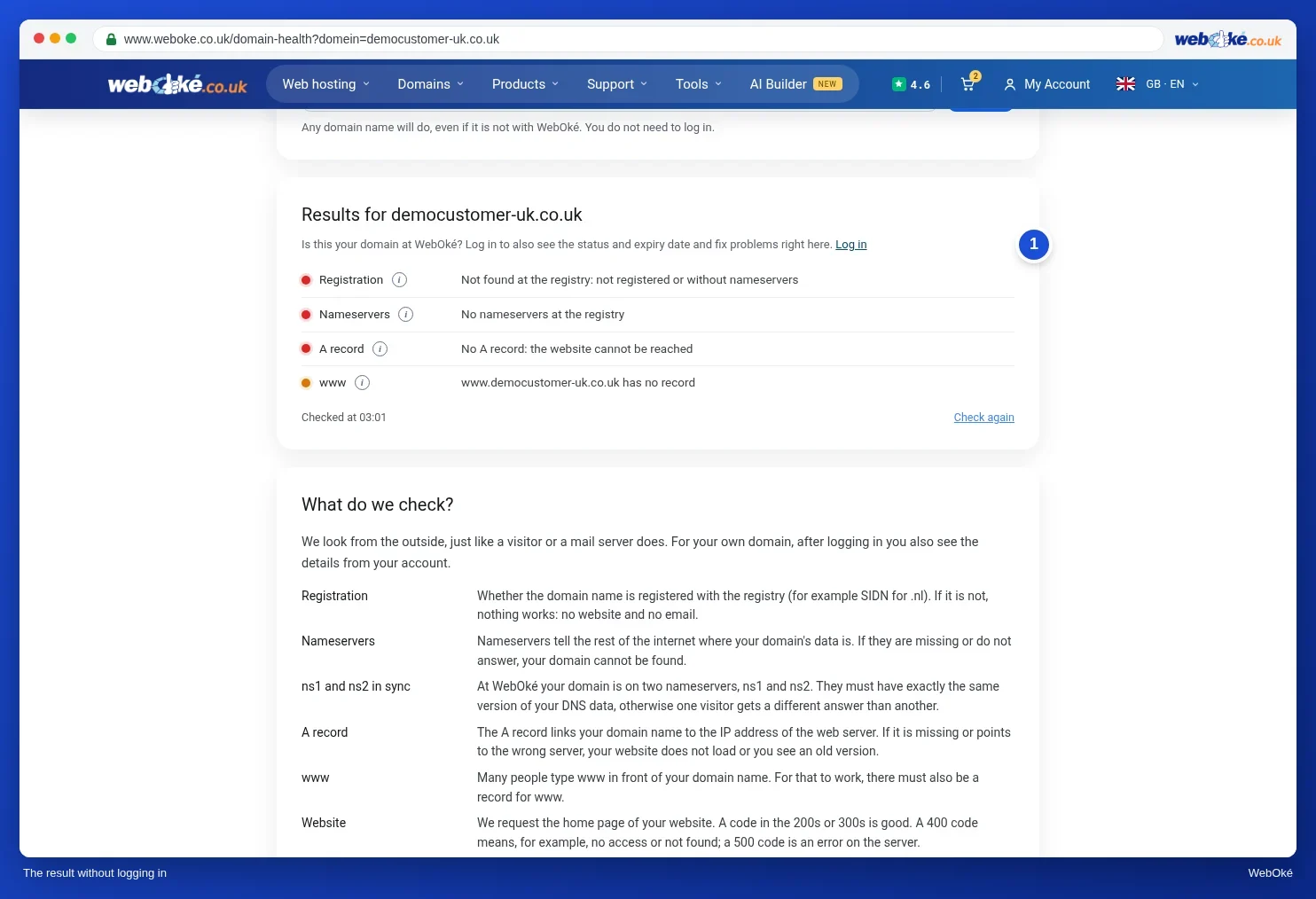
On the domain page in My WebOké you will find the Domain / Email health card. For each check you see a green, orange or red dot, with an explanation and, where possible, a fix button. For any domain, even one not registered with WebOké, you can run the same check without an account at https://www.weboke.nl/en/domain-health. Other registrars and standalone online tools offer similar checks.

Summary
- The nameservers at the registry must point to where your zone actually is, and they must all answer.
- Nameservers are domain names themselves: if that provider stops or that domain expires, your domain stops too.
- A broken DNSSEC chain is worse than no DNSSEC; pay particular attention after a transfer.
- Both the bare name and www must lead to your website.
- Checking once is not enough: have your domain monitored.
Quiz
Exercise
Exercise A7.3: Domain health. Enter your own domain name. Example names such as example.com are rejected. The program runs the same checks as Domain health, for four parts: the nameservers, DNSSEC, the A record of the bare name, and www.
Red means an error you need to fix, for example a nameserver that does not answer or a DNSSEC chain that does not match. Orange is a warning or a recommendation. Green means everything is fine. You have passed the exercise when there is no red left. If you get red, read the explanation next to it, fix it with the provider where your DNS is hosted and try again.
Further reading
- WebOké manual 5.17: Domain and email health: checking and fixing
- WebOké manual 14.1: Domain health (also without an account)
- Website or email not working after a migration or DNS change: check your domain
- Have your website monitored: availability, certificate and domain
- Free DNS course 8.1: DNSSEC in plain language