
Module 4 · 4.1
WHOIS and RDAP: how to look up a domain
Module 4: WHOIS, RDAP and privacy · Reading time: 9 minutes
Learning objective: After this lesson you can look up a domain in WHOIS and RDAP, read the most important fields and explain why you see no expiry date for .nl.
Key concepts: WHOIS (port 43), RDAP (JSON over https), registrar, reseller, registration date, last changed, expiry date, nameservers, DNSSEC (delegationSigned), WHOIS tool
Two ways to look up a domain
Every registry lets you look up what has been recorded about a domain name. There are two systems for this.
WHOIS is the old system, dating from the early days of the internet. You send a query via port 43 or through a web page of the registry, and you get a block of text back. The drawback: every registry uses its own layout. One calls a field "Registrar", another "Sponsoring Registrar". People can cope with that, but for software it is awkward.
RDAP (Registration Data Access Protocol) is its successor. You send the query over ordinary https, just like visiting a website, and the answer comes back in a fixed format: JSON. That means any program can read it. RDAP is an official internet standard (RFC 9082 for the queries, RFC 9083 for the responses). A separate standard (RFC 9224) defines how you find the right RDAP server for an extension.
For .com and other gTLDs, RDAP has been the official source since 28 January 2025. Registries and registrars of gTLDs no longer have to offer the old WHOIS, although there are exceptions such as .com. Country code extensions make their own choice. SIDN offers both for .nl: a Whois and an RDAP service. Other registries, such as those for .de, .eu and .be, have no public RDAP (as of November 2026). For those, you use the WHOIS or the search function on the registry's website.
What WHOIS and RDAP show is what is recorded at the registry. What your DNS actually answers, you see with a DNS query. The DNS course briefly explains that difference (lesson 1.3).
The fields you will come across
Here are the most important fields. The names differ per registry, but the meaning is the same everywhere.
| Field | What it tells you |
|---|---|
| Domain name | The name as the registry knows it |
| Status | Whether the name is active, locked, deleted or being transferred (lesson 4.3) |
| Registrar | The company the name is registered with; for .nl, any reseller is listed separately |
| Registration date | When the name was registered |
| Last changed | When something in the registration was last changed |
| Expiry date | Until when the registration runs at the registry (not for every extension) |
| Nameservers | The nameservers the registry points to |
| DNSSEC | Whether there is a DS record at the registry |
| Contacts | The registrant and contact persons, as far as they are public (lesson 4.2) |
In RDAP, the dates are in a list of events: "registration", "last changed" and, if the registry publishes it, "expiration". The registrar appears as an entity with the role "registrar". You can read DNSSEC from the secureDNS block: if delegationSigned is set to true, the domain is protected with DNSSEC and there is a DS record at the registry. You can read what DNSSEC is in the DNS course (lesson 8.1).
A heavily simplified RDAP response looks like this:
{
  "ldhName": "example.com",
  "status": ["client transfer prohibited"],
  "events": [
    {"eventAction": "registration", "eventDate": "..."},
    {"eventAction": "expiration", "eventDate": "..."}
  ],
  "nameservers": [{"ldhName": "ns1.example.net"}],
  "secureDNS": {"delegationSigned": true}
}
The quirks of .nl
With the Dutch extension .nl, a few things work differently from what you might expect.
- No expiry date. SIDN's Whois and RDAP show no expiry date, only the registration date and the date of the last change. How long your registration runs and when your invoice arrives is something you agree with your registrar. For .com, Verisign's RDAP does show an expiry date.
- Statuses in Dutch. In the .nl Whois you see statuses such as Actief (active), Inactief (inactive) and In quarantaine (in quarantine). In SIDN's RDAP you see "active", and sometimes "locked".
- The lock has a different name. For .com, you see a transfer lock as "client transfer prohibited". For .nl, transfers work with a transfer code (verhuiscode), and an extra lock there is called .nl Control: a registry lock you request through your registrar. In SIDN's RDAP you see the status "locked" for some names, for example for sidn.nl itself. That points to such an extra lock (lessons 4.3 and 7.1).
- DNSSEC yes or no. The .nl Whois simply says it: DNSSEC yes or no.
Where do you look it up?
- The registry's RDAP page. For .nl that is rdap.sidn.nl: you add the name after /domain/ in the address. For .com, RDAP is provided by Verisign. Your browser then shows the JSON; it takes a little getting used to, but everything is there.
- lookup.icann.org. Here you can use RDAP to look up any extension that has RDAP. It finds the right server by itself.
- Your registrar's WHOIS tool. This often uses the old WHOIS (port 43) and shows the answer as text.
Pitfall: a general WHOIS website sometimes shows outdated or incomplete data, or the registrar's data instead of the registry's. If in doubt, check with the registry itself.
In practice: how it works at WebOké
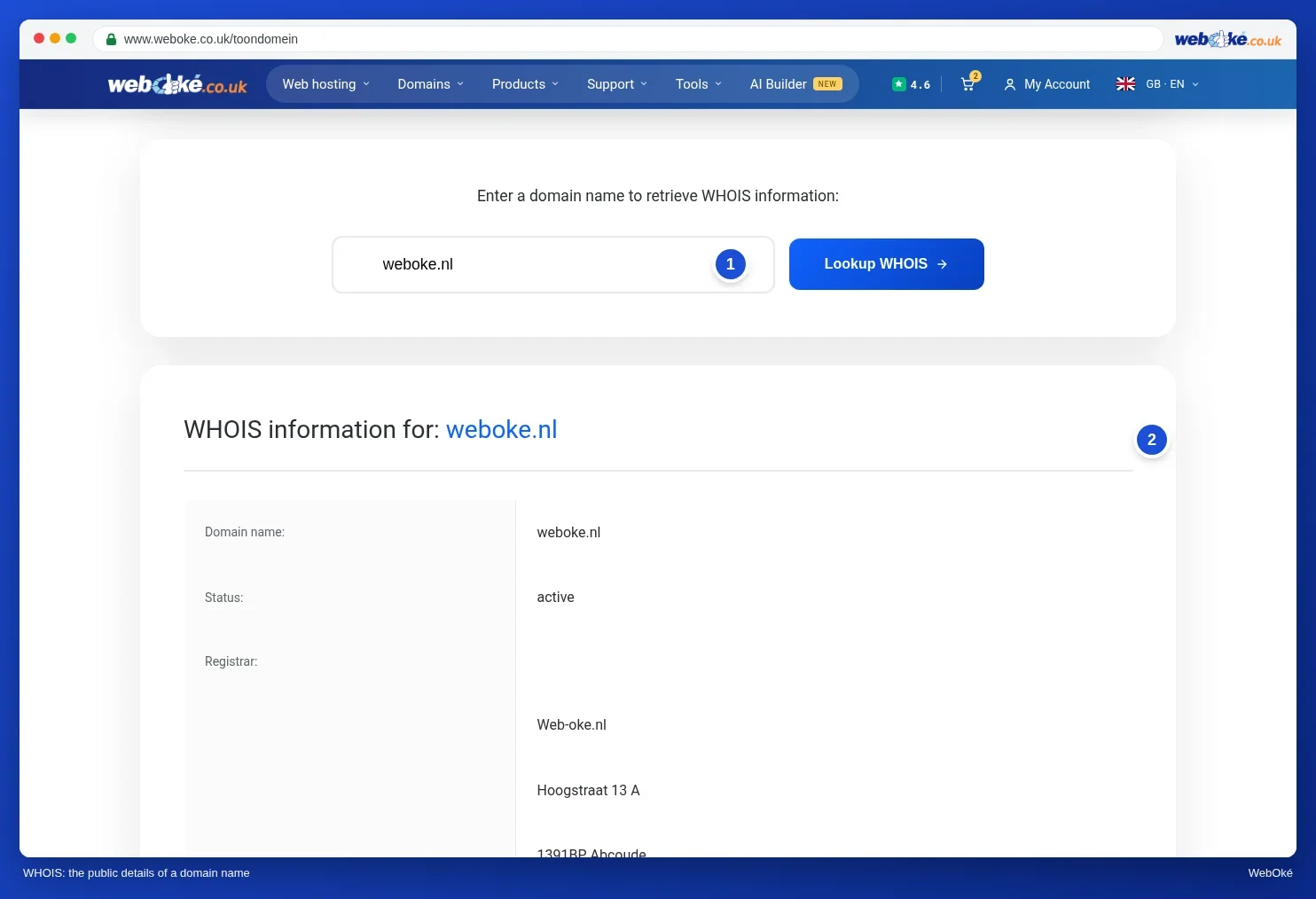
At https://www.weboke.nl/en/toondomein you will find the WHOIS lookup ("See who owns a domain name"). You enter a domain name and see the registry's answer, including the status, the registrar and the nameservers. The tool uses WHOIS via port 43, so it also works for extensions without public RDAP. You can find it on the website under the Tools menu. Other registrars work in a similar way: almost every registrar has a WHOIS search function.
Summary
- WHOIS is the old text system (port 43); RDAP is its successor, with fixed JSON responses over https.
- For gTLDs, RDAP has been the official source since 28 January 2025; .nl has both, while .de, .eu and .be have no public RDAP.
- Important fields: status, registrar, dates, nameservers and DNSSEC (secureDNS, delegationSigned).
- For .nl you see no expiry date; an extra lock there is called .nl Control, and SIDN's RDAP then shows "locked".
Quiz
Exercise
Exercise A4.1: Your domain in RDAP. Look up your own domain. If your extension has RDAP (such as .nl or .com), open the registry's RDAP page. If it does not (such as .de, .eu or .be), use the WHOIS tool at https://www.weboke.nl/en/toondomein or your registry's search function. Check two things: is there a transfer lock on it (for .com "client transfer prohibited", for .nl "locked"), and is DNSSEC switched on (delegationSigned in RDAP, DNSSEC yes in the .nl Whois)?
Fill in the form:
- Domain: your own domain name (example domains such as example.com are not accepted).
- Lock: yes or no.
- DNSSEC: yes or no.
The program queries the registry's RDAP and checks whether there is a DS record for your domain at the registry. You see the registrar, the status codes, the dates and the nameservers. Green if your answers about the lock and about DNSSEC are both correct. If an answer is wrong, you see a hint for that item and can try again. If your extension has no public RDAP, a line tells you so and the lock question does not count; DNSSEC is still checked. Nothing is changed or stored.