
Module 7 · 7.4
Managing your domains as a portfolio
Module 7: Keeping your domain safe and healthy · Reading time: 10 minutes
Learning objective: After this lesson you can keep an overview of all your domains, assign a responsible person to each domain and review your domains every year using a fixed checklist.
Key concepts: domain register, responsible person per domain, expiry date, where the DNS is hosted, what runs on it, tidying up, bulk management, annual check
From separate names to a portfolio
If you have one domain, you will remember everything about it. But after a few years there are often more: your main name on two or three extensions, a name for a campaign, an old name from before a merger, a few typo variants (lesson 7.2). Sometimes they are with different registrars and paid for by different people.
That is when things go wrong at dull moments. A payment card expires. An invoice arrives at a colleague who has left. A web developer stops working with you and nobody knows where the DNS is hosted any more. This is how organisations lose names they still use every day.
So treat your domains as a portfolio: a collection of assets that you keep track of, that someone is responsible for and that you review regularly.
The domain register
The foundation is a domain register: one list of all your domains. A spreadsheet is enough. In lesson 1.1 you made a first list; now you turn it into a permanent overview.
| Column | What you fill in | Why |
|---|---|---|
| Domain name | the full name | include defensive names and old names too |
| Registrant | name of the person or organisation | must be your organisation (lesson 3.2) |
| Registrar and account | with whom, and under which account | so you know where to log in |
| Expiry date | date from your registrar account | for .nl it is not shown in the public Whois or RDAP |
| Renewal | automatic on or off, payment method | the most common cause of losing a domain |
| Nameservers | which party hosts the DNS | needed for every outage or transfer |
| What runs on it | website, email, forwarding only, nothing | determines how bad it is if it stops |
| Responsible person | the person who looks after the domain | someone has to feel ownership |
| Security | transfer lock, two-step verification, DNSSEC | see lessons 7.1 and 7.3 |
| Decision | keep, forward, cancel; with date | for the annual check |
Pay attention to the expiry date of .nl names. The public Whois and RDAP of SIDN do not show it: you agree the term with your registrar. So take it from your account. For .com you can see the expiry date in RDAP.
Keep the register somewhere a colleague can also reach it. A list that only lives on your laptop helps nobody when you are ill.
One responsible person per domain
For each domain, appoint one person to keep an eye on it. That person does not have to do everything themselves, but they know who does and they receive the notifications.
Have notifications from your registrar go to a role address, such as an address for your accounts department, and not to the personal address of a single employee. Preferably put that address on a different domain from the names you manage (lesson 1.1). If the responsible person leaves, update the register and review access to your account (lesson 7.1).
Tidying up without breaking things
A portfolio grows by itself. Tidying up is healthy, but don't do it carelessly.
Before you let a domain go, ask yourself:
- Is email still arriving? If you let a name lapse, someone else can register it and receive email that is still sent to your old addresses. That is why SIDN warns previous registrants when a cancelled name still receives a lot of email.
- Are any accounts linked to it? An old email address on that name may be the login address for a service. With that address, the new registrant can reset the password.
- Are there still links to it? Old business cards, brochures, links on other websites.
If in doubt, keep the name for a few more years and forward it to your main name. If you no longer use it for email, lock it down for email. You can read exactly what happens after cancellation in lesson 5.3.
Managing many domains at once
If you have dozens or hundreds of names, you don't want to do everything domain by domain. Many registrars offer bulk actions for this: select several domains and, for example, change the nameservers or switch on automatic renewal in one go. Registering and transferring can often be done in bulk too.
It also helps to keep your domains with as few registrars as possible. That is not a rule, but every extra account means an extra password, an extra stream of invoices and an extra place where something can go wrong. You arrange a transfer to a single registrar as described in lessons 6.1 to 6.3.
The annual check
Review your portfolio at least once a year. Pick a fixed moment, for example the month in which you also do your annual accounts. For each domain:
- Is the registrant correct and are the details complete (lesson 3.3)?
- Does the contact address work, and is it not on the domain itself?
- Is the expiry date correct, is automatic renewal on and is the payment method still valid?
- Are two-step verification and the transfer lock switched on, and are the users in your account correct (lesson 7.1)?
- Are the nameservers, DNSSEC, the bare name and www in order (lesson 7.3)?
- Are there records in the zone pointing to something you no longer use? Remove them.
- Do you still need the defensive names (lesson 7.2)?
After the check, update the register, including the date.
In practice: how it works at WebOké
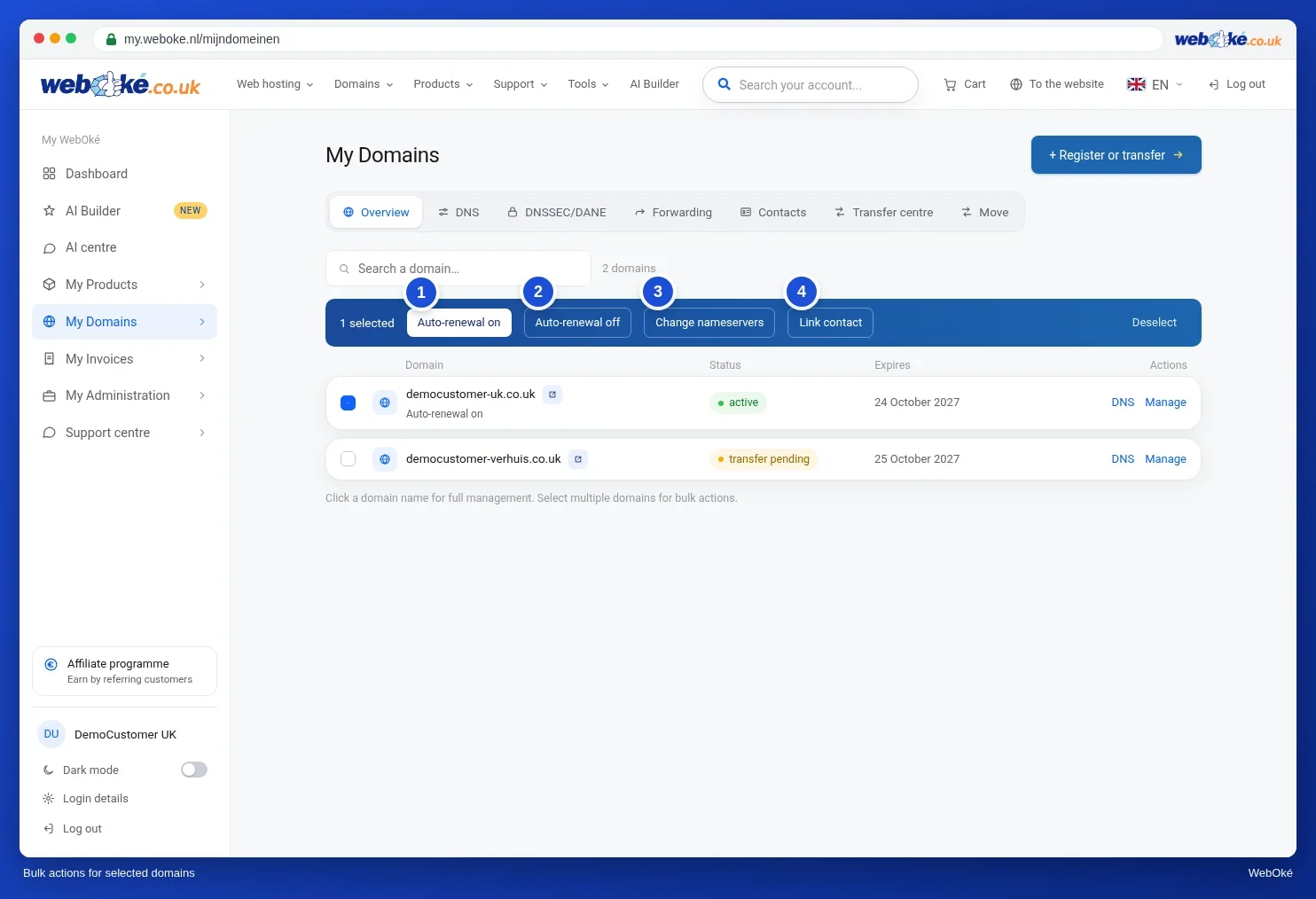
In My WebOké all your domains are listed under My Domains, with the status and expiry date for each domain. If you select several domains, a bar appears with actions for all of those domains at once. To register or transfer many names, use Bulk register/transfer: paste the domains, one per line, and click Check. Other registrars work in a similar way: look for a domain overview with an export option or bulk actions.
Summary
- Treat your domains as a portfolio: one register, one responsible person per domain, a fixed annual check.
- For each domain, the register includes the registrant, registrar, expiry date, nameservers, what runs on it and a decision, among other things.
- You take the expiry date of a .nl name from your registrar account, not from the public Whois.
- Only tidy up after checking email, linked accounts and links; if in doubt, forward the name.
- Bulk actions and as few registrars as possible make management simpler.
Quiz
Exercise
Exercise A7.4: Final check of your domain. Enter your own domain name (field domein). Example names such as example.com are rejected. The program looks up three things:
- RDAP at the registry: whether the name is registered, whether there is no bad status on it (such as redemption, pending delete or hold), the expiry date, and for gTLDs such as .com whether the transfer lock is on. If the registry has no public RDAP (as with .de, .eu, .be and .nu), you will see an information line and the program continues with the rest.
- The DNSSEC chain: whether the DS record at the registry matches your keys.
- Nameservers, the bare name and www: the same checks as in exercise A7.3.
Red is an error, orange a warning. You have passed the exercise if there is no red and orange appears at most twice.
Exercise D7.4: Your domain register. Create a domain register of all your domains, for example in a spreadsheet with the columns from this lesson: domain name, registrant, registrar and account, expiry date, renewal, nameservers, what runs on it, responsible person, security and decision. Start with the list from exercise D1.1.
Tick off:
- All domains are in the register, including defensive and old names.
- For each domain, the expiry date has been filled in from the registrar account.
- Each domain has one responsible person.
- The register is kept somewhere a colleague can also reach it.
- You have chosen a fixed month for the annual check and put it in your calendar.
Answer:
- How many domains do you have, and with how many registrars are they?
- Which domain expires first, and is automatic renewal switched on for it?
- Which domains do you want to cancel or forward, and what do you check before you do?
- Who takes over the register when you are not around?
Exercise D7.4: Your domain register
You do this exercise yourself; no one checks it. Tick off what you've done and mark the exercise as done.
1. A number of domains and registrars; possibly the intention to move to fewer registrars. 2. A domain with its expiry date (from the registrar account, for .nl not from the Whois) and the status of automatic renewal and the payment method. 3. A decision per domain (keep, redirect, cancel) and, beforehand, a check for incoming mail, accounts linked to addresses on that name, and links. 4. A specific person or role with access to the register and the registrar account.
Your ticks and notes only stay in this browser; we don't send them anywhere. If you're signed in, we only save in My courses that you've done the exercise.