
Renewing and auto-renewing
Module 5: Renewing, expiring and cancelling · Reading time: 9 minutes
Learning objective: After this lesson you can set up the renewal of your domain so that it never expires by accident, and you know which renewal emails are genuine.
Key concepts: registration period, expiry date, auto-renew, payment method, reminders, renewal invoice, fake invoice, several years in advance, a contact address that works
Why domains expire by accident
A domain name always runs for a registration period, usually one year (lesson 1.1). At the end of that period it has to be renewed, or your right to it lapses. That sounds simple, but in practice this is where things often go wrong. Almost never because someone deliberately stops, but because of a small mistake that nobody notices:
- The renewal payment fails, because the credit card has expired or the direct debit has been reversed.
- The reminders go to an email address nobody reads any more, for example that of a former employee or of the web designer.
- The reminders go to an address on the domain itself. As soon as the domain stops working, that email no longer arrives either.
- Someone switches off auto-renew "to think about it" and then forgets.
- The genuine reminder gets lost among the fake invoices and is clicked away as spam.
The result is rarely dramatic straight away: there is usually still a period in which you can get the name back (lesson 5.2). But during that time your website and email often stop working already. And if you notice too late, you can really lose the name.
Auto-renew: how it works
Almost every registrar offers auto-renew. If it is on, the registrar renews the name itself at the end of the period and sends you an invoice or collects the amount. If it is off, you have to renew in time yourself, or the registration ends.
Auto-renew is only as good as the payment behind it. So check three things:
- Is it switched on for every domain you want to keep?
- Does the payment method work: is the card still valid, is there a direct debit mandate, does the invoice get paid?
- Does the invoice reach someone who pays it?
Watch out for differences between registrars. With one, "auto-renew off" means you have to renew yourself; with another, it means you cancel the name as of the end date. So read what happens before you flip that switch.
For .nl there is something special. SIDN does not know why a name is deleted: that is a matter between you and your registrar. A .nl name can therefore also disappear "by accident", for example if your registrar assumes you renew yourself every year and that does not happen. In the .nl Whois and SIDN's RDAP you also see no expiry date: you agree the term with your registrar. For .com you do see an expiry date in RDAP (lesson 4.1).
Reminders: which emails are genuine?
For gTLDs such as .com, your registrar is obliged to warn you. Under ICANN's rules this happens roughly one month and one week before the expiry date, and once more within five days after the expiry date if you have not renewed. For country-code extensions, your registrar handles reminders under its own terms and conditions.
Besides genuine reminders, as a registrant you also receive fake messages. SIDN has been warning for years about fake invoices for domain names, under names such as "Domeinregistratie Nederland" or "DNS Registraties NL". Often the small print at the bottom says it is not an invoice but an offer. Another form is a message saying "someone else wants to register your name with a different extension" and that you must pay quickly to get in first. A right of first registration does not exist.
This is how you recognise a genuine reminder:
- It comes from the registrar where your domain is held, not from an unknown company or from "the registry". SIDN itself does not sell .nl names to registrants.
- It mentions your customer number or your account and refers to the panel you already log in to.
- You can check it by logging in to your registrar yourself, without clicking the link in the email.
If in doubt, do not pay and check with your own registrar. In the Netherlands you report fake invoices to the Fraud Helpdesk (Fraudehelpdesk).
Several years in advance
You can often register or renew a name for several years at once. For .com a registration can run up to a maximum of ten years ahead. That has advantages: less chance of a renewal falling through the cracks, and less work for a name you are sure to keep, such as your main domain.
There are also downsides. A long period is no substitute for good management: the expiry date is so far away that nobody thinks about it any more, and the contact address quietly goes out of date. And if you want to transfer or stop in a few years, what happens to the prepaid years depends on your registrar. For a name you have just secured for a campaign or an idea, one year is usually enough.
A contact address that works
The most important insurance against an expired domain is an email address that works and is read. For your account with the registrar and for the registrant, choose an address:
- on a different domain from the domain itself, or a second address as a backup;
- that belongs to the organisation and not to one person, such as a shared mailbox;
- that is not with your web designer, unless they really manage it for you and you also read along.
In addition, put the expiry dates of your important domains in your own calendar, one month in advance. Then you will notice even if something is wrong with the email. In lesson 7.4 you turn this into a permanent domain register.
In practice: how it works at WebOké
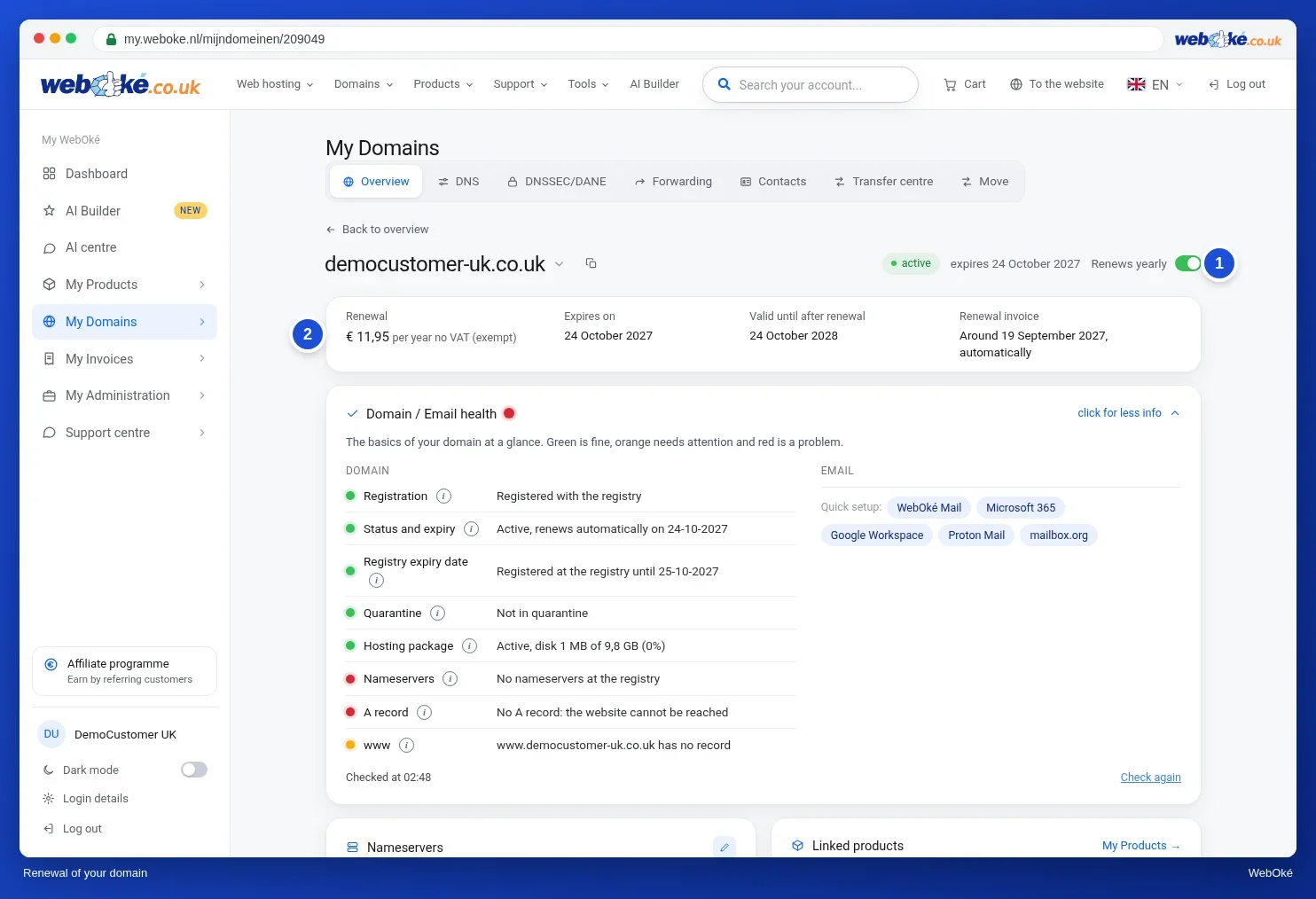
In My WebOké, the Renewal card sits at the top of every domain page, with Expires on and the Renewal invoice. There you also see the Auto-renew on/off switch. The renewal invoice arrives well over a month before the expiry date, 35 days in advance. If you switch auto-renew off, the Cancel domain window opens: at WebOké, switching it off therefore means cancelling as of the end date, and you can reverse that with Undo cancellation. Other registrars work in a similar way, but always check what "off" means there exactly.
Summary
- Domains usually expire because of a small mistake: a failed payment, an old email address or a forgotten switch.
- Auto-renew only works if the payment method is right and the invoice arrives.
- For .com your registrar must warn you beforehand and shortly after the expiry date; fake invoices come from unknown companies, not from your registrar.
- Renewing several years in advance helps, but does not replace good management.
- Use a contact address that is read and is not on the domain itself, and put the expiry date in your calendar.
Quiz
Exercise
Exercise D5.1: Your renewal checked. Choose your most important domain and find out how its renewal is set up. At WebOké you will find everything on the domain page in My WebOké: the Renewal card, the Auto-renew switch and the Domain contacts card. With another registrar, look for the same details in its panel.
Tick off:
- I know the expiry date of my most important domain and have put it in my calendar, one month in advance.
- Auto-renew is switched on for every domain I want to keep (or I know exactly what "off" means at my registrar).
- The payment method for the renewal is valid and the invoice goes to someone who pays it.
- The email address of my account and of the registrant works, is read and is not on the domain itself (or there is a backup address).
- I know what a genuine reminder from my registrar looks like and how to check it without clicking a link.
Answer for yourself:
- What is the expiry date of your domain, and how did you find out?
- Which email address do the reminders and the renewal invoice go to, and who reads that address?
- What happens at your registrar if you switch off auto-renew?
Exercise D5.1: Your renewal checked
You do this exercise yourself; no one checks it. Tick off what you've done and mark the exercise as done.
1. A concrete date, found in the registrar's control panel (at WebOké: the Renewal card, "Expires on") or, for .com, in RDAP. For .nl not from SIDN's Whois/RDAP, as it does not show an expiry date. 2. A concrete address that belongs to the organisation (shared mailbox), preferably on a different domain or with a backup address; a person who reads it. Not: the address of a former employee or only of the web designer. 3. What switching it off means at that registrar: renewing manually or cancelling as of the end date. At WebOké, switching it off opens the Cancel domain window (cancellation as of the end date, reversible with Undo cancellation).
Your ticks and notes only stay in this browser; we don't send them anywhere. If you're signed in, we only save in My courses that you've done the exercise.
Further reading
- WebOké manual 5.13: Renewal and auto-renewal
- Protecting your domain name: expiration, auth code, transfer lock and forgotten DNS records
- Cancelling products and domains, withdrawing a cancellation, and what happens next
- Expired Registration Recovery Policy (ICANN): https://www.icann.org/resources/pages/errp-2013-02-28-en