
Module 3 · 3.3
Accurate details, verification and NIS2
Module 3: Registering and the registrant · Reading time: 8 minutes
Learning objective: After this lesson you can explain why your registration details must be accurate and complete, what NIS2 says about this, what happens if they are wrong and how you keep them up to date.
Key concepts: accurate and complete details, verification, NIS2 (Article 28), Cybersecurity Act (Cyberbeveiligingswet), suspension, registrant email address, registration reminder
Why your details matter
Every time you register a domain, you provide details: the registrant's name, address, email address and often a phone number. Many people fill this in quickly and never look at it again. That is a shame, because these details are used exactly when things get tense:
- For .de, DENIC sends the transfer code on request by registered letter to the registrant's address. If the address is wrong, the letter does not arrive.
- For .be, DNS Belgium sends the transfer code by email to the registrant. An old email address means: no code.
- For .nl, email from SIDN to the administrative contact counts as received by the registrant, even if nobody reads that address any more.
- Your registrar sends renewal reminders to the contact address. If that email does not arrive, your domain may expire without you noticing (module 5).
So accurate details are not just an obligation. They are your own safety net.
What NIS2 requires
The rules have become stricter in recent years. The European NIS2 Directive is about the digital resilience of essential services. Domain names are part of that. Article 28 of NIS2 requires registries and registrars to:
- collect and maintain accurate and complete registration data;
- publish how they check that data (their verification procedures);
- publish data that is not personal data, such as company details;
- respond quickly to lawful, duly justified requests for data, and in any case within 72 hours.
Each EU country transposes NIS2 into its own legislation. In the Netherlands this is the Cybersecurity Act (Cyberbeveiligingswet, Cbw), which came into force on 15 August 2026. In Germany, the obligation to keep domain data accurate is in the BSI-Gesetz. That is why DENIC may ask for proof and contact registrants by email or post.
For you as a registrant, this means registrars must check registrants' details. So you may receive an email or a request to confirm your details. That is not a scam but a legal duty. Do stay critical: check that the message really comes from your own registrar or from the registry, and do not just click links in an unexpected email (lesson 7.1). It is better to log in to your registrar yourself.
What happens if your details are wrong
If your details are wrong, or you do not respond to a request to confirm them, the registry can step in. A clear example is .eu. If a registrant does not confirm their details after a verification request from EURid, the name can be suspended ("suspended"). The name then stops working, you cannot transfer it, and the Whois shows "Server Hold". If you do not (or no longer) meet the conditions for .eu, you can even lose the name.
Other extensions work broadly the same way: the registry's terms say you must provide accurate details, and if you do not, you are at risk. The moment it goes wrong is often inconvenient: in the middle of a transfer, or just when your website is busy.
Accurate is not the same as complete. A registration can be formally correct but still useless, for example:
- the registrant is a private limited company (bv) that was dissolved years ago;
- the address is the old office;
- the email address belongs to an employee who has already left;
- the email address is on the domain itself, so the email does not arrive if the domain is not working.
The registrant's email address
The most important field is the email address. That is where verification requests, transfer codes, confirmations of a holder change and renewal reminders arrive. So choose an address that:
- you really read, even when you are on holiday or someone is ill;
- does not depend on one person, so preferably a general address of the organisation;
- is not on the domain itself, or at least has a second address on another domain.
Tip for organisations: create a fixed address for domain management and have it delivered to two people. Then nothing grinds to a halt when one of them leaves.
When should you update your details?
Put a reminder in your calendar to check your details. A fixed moment once a year works well, for example when the renewal invoice arrives. Also check straight away when there is:
- a move of your business or a new postal address;
- a new name or legal form (note: a sole proprietorship that becomes a bv is a holder change, lessons 3.2 and 6.4);
- the departure of the employee whose address is listed as a contact;
- a change of web developer or registrar.
Note the difference between your account details at the registrar (who logs in and receives the invoices) and the domain contacts (who is listed at the registry as registrant and contact). These can differ. If you change one, check the other too.
In practice: how it works at WebOké
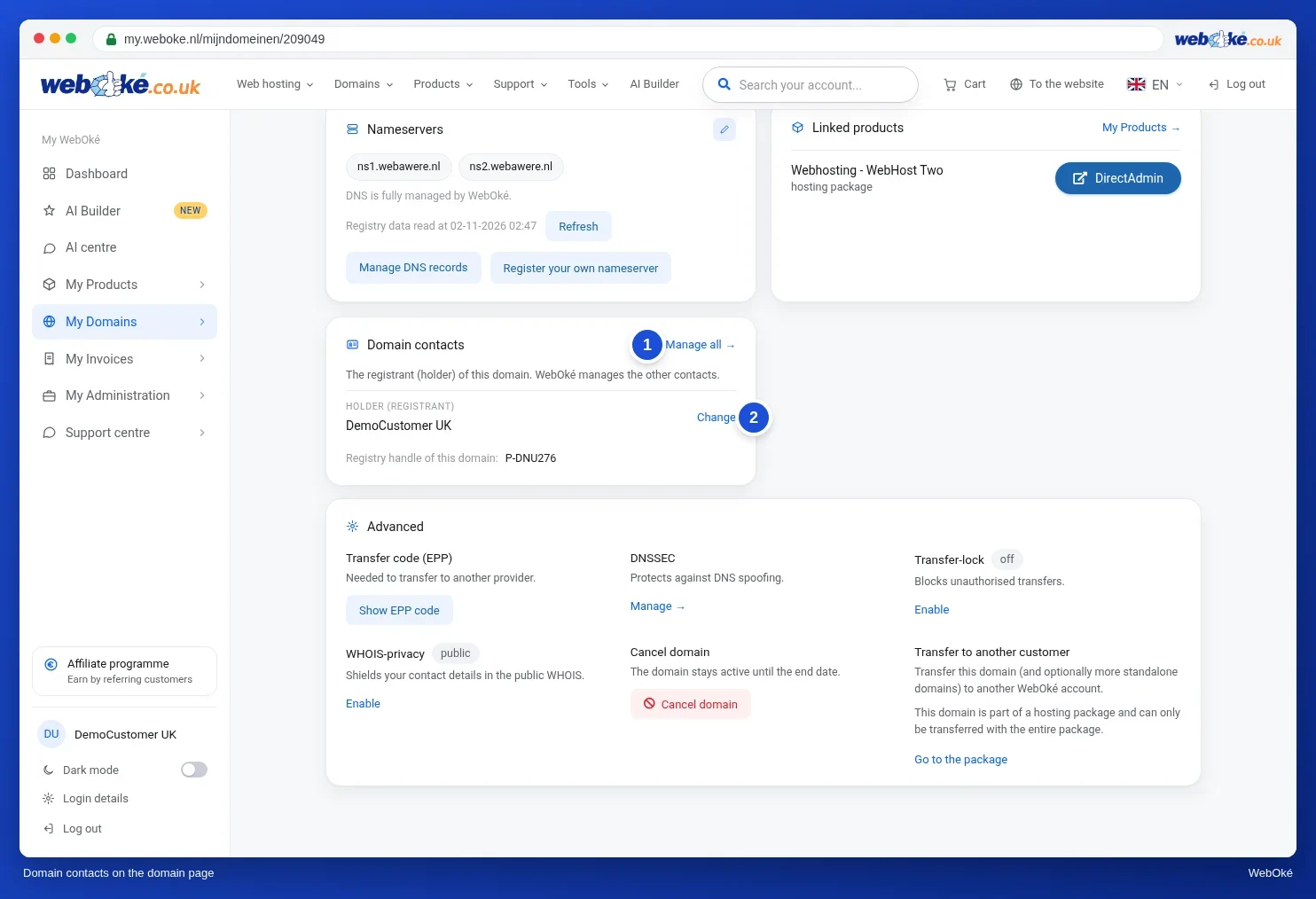
In My WebOké, the domain page shows the Domain contacts card with the registrant. The Contacts tab lists the Holder (registrant) and the Administrator (admin contact). If required registration details are missing, WebOké sends a registration reminder every 14 days until they are filled in. For .nu, the registry asks for an identification number; you enter it via a personal link. You change your account details separately. Other registrars work in a similar way: there is a place for your account and a place for the contacts per domain.
Summary
- Your details are your safety net: transfer codes, verifications and reminders go to the address listed with your domain.
- NIS2 Article 28 requires registries and registrars to maintain and verify accurate and complete data; in the Netherlands through the Cybersecurity Act since 15 August 2026.
- If your details are wrong, your name can be suspended or even revoked, as with .eu.
- Choose an email address that you really read, that does not depend on one person and preferably is not on the domain itself.
- Check your details every year, and straight away after a move, a new legal form or an employee leaving.
Quiz
Exercise
Exercise D3.3: Checking your own details. Take a domain you manage and check its details at your registrar. At WebOké you do this in My WebOké: open the domain page and look at the Domain contacts card, then check the holder and the administrator in the Contacts tab. If you recently received a registration reminder, fill in the missing details first. At another registrar, look for the contact details or the owner of the domain.
Tick off:
- The registrant is the right person or organisation (not the web developer or a former employee).
- The registrant's name, legal form and address are correct.
- I really read the email address of the registrant and of the administrative contact, and it is not only on the domain itself.
- I have checked both my account details and the domain contacts.
- I have set a fixed moment in my calendar to check this every year.
Fill in:
- Who is listed as registrant and as administrative contact, and is that correct?
- Which email address is listed, and what happens to email sent to it if the domain is not working?
- What have you changed, or what are you going to change?
Exercise D3.3: Checking your own details
You do this exercise yourself; no one checks it. Tick off what you've done and mark the exercise as done.
Names the holder and admin contact (at WebOké: the Domain contacts card and the Contacts tab: Holder (registrant), Administrator (admin contact)) and assesses whether this is the right organisation or person, with a current legal form and address. Recognises that email to an address on the domain itself does not arrive if the domain stops working (missed transfer codes, verifications, renewal reminders) and chooses a general address on a different domain that more people read. Names a concrete action (change the holder, update the address, fill in missing details after a registration reminder, a yearly check moment).
Your ticks and notes only stay in this browser; we don't send them anywhere. If you're signed in, we only save in My courses that you've done the exercise.
Further reading
- Manage domain contacts in one overview
- WebOké manual 5.10: Domain contacts and changing the owner
- WebOké manual 11.1: Changing your details and invoice address
- New NIS2 directive to regulate domain name registrations in the EU (SIDN): https://www.sidn.nl/en/news-and-blogs/new-nis2-directive-to-regulate-domain-name-registrations-in-the-eu