
Transferring away: transfer code and transfer lock
Module 6: Transferring and changing ownership · Reading time: 11 minutes
Learning objective: After this lesson you can move a domain away from your current registrar, use the transfer lock and the transfer code safely, and you know what to do if your domain is transferred without you asking for it.
Key concepts: transfer code, transfer lock, clientTransferProhibited, five-day deadline, 60-day rule, unauthorised transfer, contract with the old registrar
The other side of a transfer
In lesson 6.1 you saw how a transfer works from the side of your new registrar, and in lesson 6.2 how your website and email keep working. This lesson is about the side people often forget: the registrar you are leaving.
At that old registrar, your domain has two locks. The first is the transfer lock, a block that stops transfers. The second is the transfer code (verhuiscode): without that code, nobody can take your domain away. Both locks protect you against a transfer you do not want. You only open them when you want to leave yourself, and for as short a time as possible.
The transfer lock: switch it off just before the transfer
You can see the transfer lock in WHOIS or RDAP as the status code clientTransferProhibited (lesson 4.3). As long as it is on, the registry refuses every transfer, even if someone has the correct code. So it is a second lock behind the code.
Only switch the lock off just before you start the transfer. If you switch it off weeks in advance, you leave the door open for longer than necessary. If the transfer does not go ahead, switch the lock back on.
Not every extension has a transfer lock you control yourself. With .com and other gTLDs it does: if you cannot switch the lock off in your account yourself, your registrar must remove it for you within five days (as of November 2026). With .nl, .eu, .be and .nu, among others, there is usually no transfer lock you switch on and off yourself. There, the transfer code itself is the security. For important .nl names there is an extra lock at the registry itself, .nl Control. You can read more about this in lesson 7.1.
Requesting the transfer code
The transfer code has a different name for each extension and does not reach you in the same way everywhere. As of November 2026:
| Extension | Name of the code | Where you get it | Good to know |
|---|---|---|---|
| .nl | transfer code (verhuiscode; SIDN says "token") | from your registrar, which must provide it within five days | If that fails, your new registrar can call in SIDN |
| .de | AuthInfo | your provider creates it, or DENIC sends it by post | Valid for 30 days at most, works for one transfer |
| .eu | authorisation code (transfer authorisation code) | from your registrar or yourself in My .eu | 16 characters, valid for 40 days or until it is used |
| .be | transfer code | DNS Belgium emails it directly to the registrant | Valid for 7 days; requesting it again extends it by 7 days |
| .com | auth code or EPP code | from your registrar, within five days | The old registrar has five calendar days to respond |
If your registrar refuses to give you the code, point out that five-day deadline. With .nl, your new registrar can then ask SIDN to step in.
In June 2026, ICANN adopted new transfer rules for gTLDs, including a code that is valid for a shorter time. There is no date yet for when they take effect. Until then, the rules in this lesson apply.
Passing on the code safely
Treat the transfer code as the key to your domain. Whoever has it can take your domain to another registrar. With .be, the same code can even be used to put the name in the name of a different registrant.
A few fixed rules:
- Only request the code when you are actually going to transfer. A .eu code stays valid for 40 days. All that time, it can be used by anyone who gets hold of it.
- Only give it to the registrar you are moving to. Enter it yourself in the order or in that registrar's transfer form.
- Never email it to someone who asks for it. Not even if the email looks as if it comes from your registrar, the registry or a "domain security" service. A real registrar does not ask you for your own code.
- Is your web developer handling the transfer? Then only give them the code if you know which registrar the domain is going to and in whose name. You remain the registrant (lesson 3.2).
Pitfalls when leaving
The 60-day rule for .com. A registrar may refuse to transfer a .com name within 60 days of registration or of a previous transfer. So a name you registered last month usually cannot be moved yet. After a change of registrant, the registrar also sets a 60-day transfer block, unless you chose in advance to skip it (lesson 6.4).
The expiry date. Do not start in the last few days before the expiry date. If the transfer gets stuck, you will still have to renew with the old registrar so you do not lose the name (module 5).
The DNS does not move automatically. A transfer moves the registration, not your records. If your DNS is on the old registrar's nameservers, it may stop working after the transfer. So move the zone first. You can read how to do that without disruption in lesson 6.2 and in the DNS course (lesson 6.3).
DNSSEC. If you use DNSSEC, first arrange how the security will keep working during the transfer (lesson 6.2).
The contract with the old registrar. With .nl you can always switch registrars, but your contract with the old registrar does not end automatically. What you still owe there depends on your agreements. Only cancel hosting and email there once everything works at the new place.
Transferred without you asking
Sometimes a domain suddenly disappears from your account. Or you get an email about a transfer you did not request. In RDAP you then see, for example, the status pendingTransfer or already a different registrar.
First check whether someone else started the transfer: your web developer, a colleague or a new provider where you ordered a package. A transfer only starts with the transfer code, so someone has used it.
If it was not intended, contact your registrar immediately. Give the domain name and the date, and provide the proof that you are the registrant that your registrar asks for (for a business, for example, an extract from the trade register in your country, in the Netherlands the KVK). Do not send a copy of your ID on your own initiative. Your registrar can find out what happened and whether the transfer can still be reversed. The faster you are, the better the chance.
With .com, during a transfer you often get an email asking you to approve or reject it. If you do nothing, the transfer goes ahead automatically after five days. If you did not request anything, reject it and contact your registrar.
In practice: how it works at WebOké
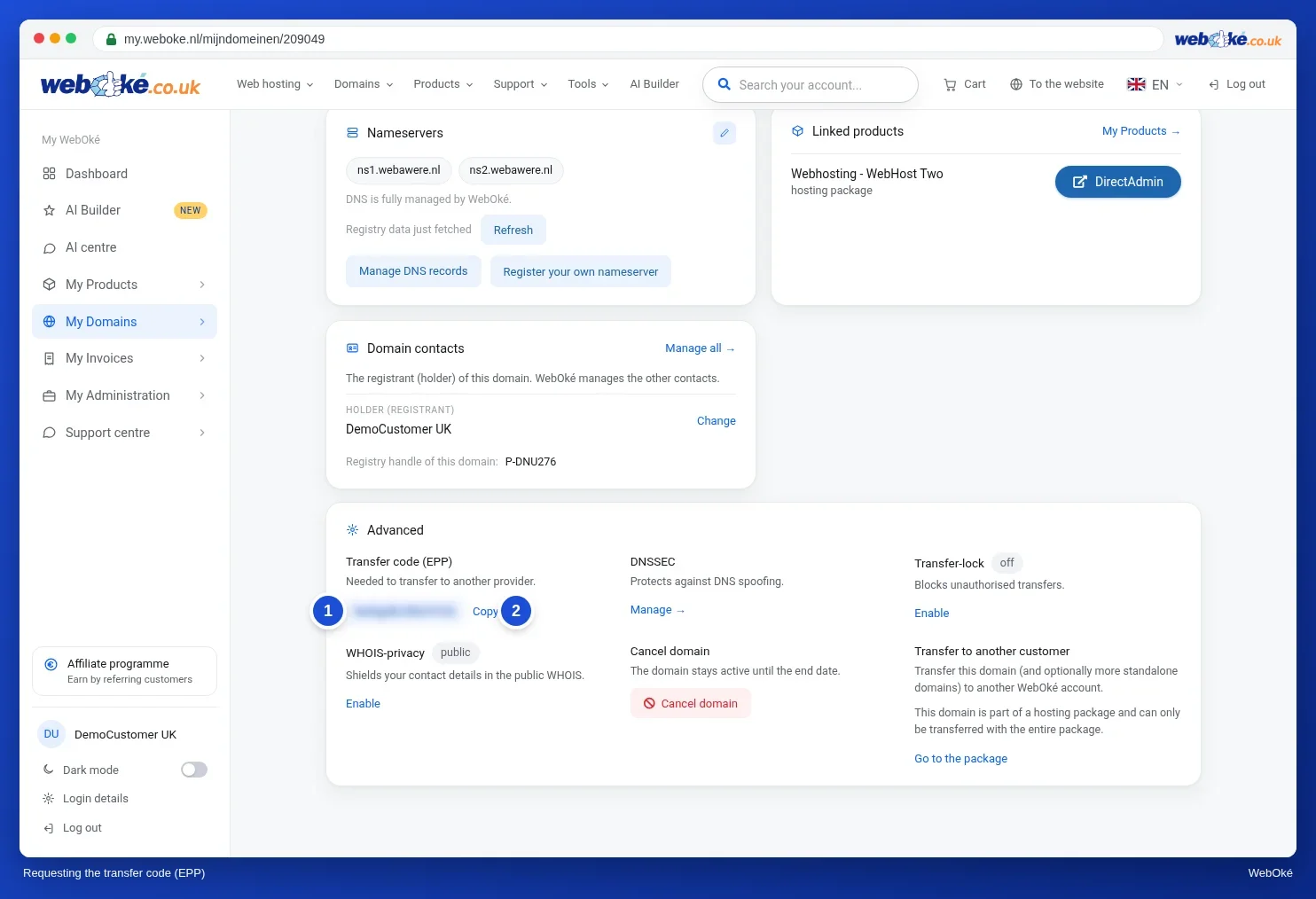
On the domain page in My WebOké you will find the Advanced card. There you will find Transfer code (EPP) with the Show EPP code button, and the Transfer lock switch ("Blocks unauthorised transfers."). That switch is not available for .nl, .eu, .be and .nu: there, the transfer code is the security. If you need the codes for many domains at once, use the Request EPP codes option in the Transfer centre. You request the code for a .be name from DNS Belgium itself. Other registrars work in a similar way, only the buttons have different names.
Summary
- A domain has two locks: the transfer lock (where the extension has one) and the transfer code.
- Only switch the transfer lock off just before the transfer, and back on if it does not go ahead.
- The transfer code is the key to your domain: only for the registrar you are moving to.
- With .com, a registrar may refuse a transfer within 60 days of registration or a previous transfer; DNS and DNSSEC never move automatically.
- Transferred without you asking: check what happened and contact your registrar immediately.
Quiz
Exercise
Exercise A6.3: Transferring away safely (case study). Bakkerij Example wants to transfer its .com name to another registrar. The owner has written down four statements he heard from others. For each statement, choose True or False.
- You only switch off the transfer lock just before you start the transfer.
- You can email the transfer code to anyone who asks for it, because without the lock nobody can do anything with it.
- The domain's DNS records always move automatically to the new registrar during a transfer.
- A .com name registered three weeks ago usually cannot be transferred to another registrar yet.
For each statement you choose from: True, False. The program compares your answers with a fixed key. If you get one wrong, you will see a hint for that statement and can try again.