
How a domain transfer works
Module 6: Transferring and changing ownership · Reading time: 10 minutes
Learning objective: After this lesson you can explain how a transfer to another registrar works for each extension, which code you need and what does and does not move across automatically.
Key concepts: transfer (change of registrar), transfer code (verhuiscode), token (.nl), AuthInfo (.de), transfer authorisation code (.eu), transfer code (.be), auth code or EPP code (gTLD), transfer lock, 60-day rule, renewal on a gTLD transfer, nameservers and DNS
What exactly is a transfer?
With a domain transfer, your domain name moves from one registrar to another. You stay the registrant and the name stays the same; only the place where you manage it changes. That is different from a change of holder, where the name is put in the name of a different registrant (lesson 6.4). The two can happen at the same time, but they are separate actions.
A transfer always follows the same pattern:
- You request a transfer code from your current registrar. It is a kind of password that proves the registrant agrees.
- You give the name and the code to your new registrar.
- The new registrar requests the transfer from the registry.
- The registry moves the name to the new registrar.
The code is the key to your domain. Anyone who has it can take the name away. So only give it to your new registrar, and never through a public channel (lesson 6.3).
The code and the rules per extension
The name of the code and the rules differ per extension (as of November 2026):
| Extension | Name of the code | How you get it | Details |
|---|---|---|---|
| .nl | transfer code (verhuiscode; SIDN: token) | From your registrar, which must provide it within five days | If the request is in order, the name transfers immediately |
| .de | AuthInfo | Your provider creates it, or DENIC sends it by post | Valid for up to 30 days, for one transfer; if the code is correct, the name transfers immediately |
| .eu | transfer authorisation code | From your registrar, or create it yourself in My .eu | 16 characters, valid for 40 days or until it is used |
| .be | transfer code | DNS Belgium sends it to you by email | Valid for 7 days; can also be used for a change of holder |
| .com and other gTLDs | AuthInfo code, also called EPP code or auth code | From your registrar, within five days | The old registrar has five calendar days to respond |
If your registrar does not give you the .nl code within five days, your new registrar can call in SIDN. For .be you do not request the code from your registrar but from DNS Belgium, which sends it by email. Make sure the email address in your domain details works, or you will get stuck here.
gTLDs: lock, 60 days and an extra year
For .com and other gTLDs, the ICANN rules apply. Three things matter.
The transfer lock. Many registrars put a transfer lock on a gTLD name by default: the status clientTransferProhibited (lesson 4.3). That is normal security. Before you transfer, the lock has to be removed. If you cannot do that yourself in your account, the registrar must do it for you within five days. Only switch the lock off just before you transfer (lesson 6.3).
The 60-day rule. A registrar may refuse a gTLD transfer within 60 days of registration or of a previous transfer. After a change of holder, the registrar must even apply a 60-day transfer lock, unless you chose beforehand to skip it (if the registrar offers that). If you have just registered a name or changed the holder, expect to wait a while before you can transfer.
An extra year. A successful gTLD transfer extends the registration by one year, up to a maximum of ten years ahead. So you do not lose any time you had already paid for.
In June 2026 ICANN adopted a revised Transfer Policy, including shorter deadlines. There is no effective date yet. Until there is, the rules above apply.
For .nl it works differently. You can change registrar at any time, but your contract with the old registrar does not end automatically. What you still owe there depends on your agreement with that registrar. The "extra year" rule is an ICANN rule for gTLDs. Ask your new registrar how the registration term works after a transfer for .nl, .de, .eu and .be.
When a transfer fails
Most failed transfers have a simple cause:
- The code is wrong or has expired. For .de and .be, codes are only valid for a short time.
- The transfer lock is still on (gTLD).
- The name is too new or was just transferred (gTLD, 60 days).
- The name is in a redemption period, in quarantine or on hold. It usually has to be restored or sorted out first (lesson 5.2). For example, you cannot transfer a suspended .eu name. An exception is .be: there, a transfer out of quarantine to another registrar is possible.
- A transfer is already in progress. In RDAP you will then see pendingTransfer.
- The name is about to expire. That is not prohibited, but a transfer that gets stuck just before the expiry date can put your domain at risk. Transfer well in advance.
What does not move across automatically
A transfer only moves the registration. You have to arrange everything else yourself:
- Nameservers and DNS. In principle, the nameservers stay the same during a transfer. If your DNS is hosted by your old registrar, the zone stays there until the old registrar removes it because you are no longer a customer. So set up the DNS in its new place first (lesson 6.2).
- DNSSEC. If your domain is secured with DNSSEC, it has to move across correctly or be switched off first. Lesson 6.2 points you to the explanation.
- Website and email. These are with your hosting provider, not with the registrar. If you move them too, that is a separate migration.
- Settings at the old registrar, such as forwarding, WHOIS privacy or automatic renewal. Check whether you need to switch them on again at the new registrar.
In practice: how it works at WebOké
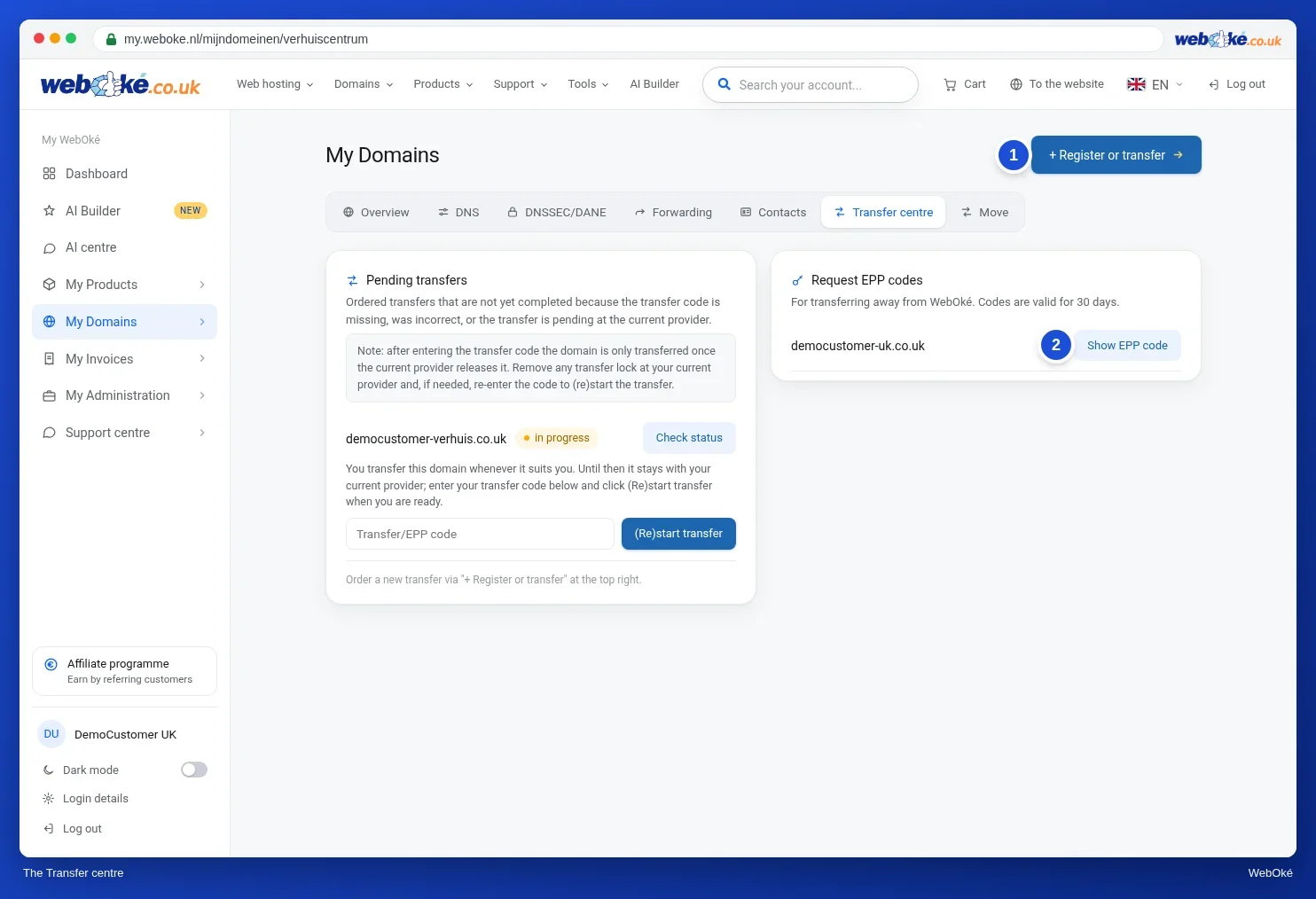
When you transfer a domain to WebOké, you enter the Transfer code (EPP token) at checkout, or you choose Transfer later. In My WebOké you can see your transfers in the Transfer Centre, with the buttons (Re)start transfer and Request status. According to the website, a .nl, .be or .eu transfer is usually completed within 2 to 4 hours, while a .com transfer can take up to 5 days. To transfer away, go to the domain page and use Show EPP code on the Advanced card. You request a .be code from DNS Belgium yourself. Other registrars work in a similar way.
Summary
- A transfer moves your domain to another registrar; you remain the registrant.
- You need a transfer code; its name, validity and where it comes from differ per extension.
- For gTLDs: remove the transfer lock, not within 60 days of registration or a transfer, and an extra year after the transfer.
- A transfer usually fails during a redemption period, in quarantine, on hold or when a transfer is already in progress.
- DNS, DNSSEC, website and email do not move across automatically.
Quiz
Exercise
Exercise A6.1: Can my domain be transferred? In the domain field, enter the name of your own domain (not an example domain). The program only looks up public data and changes nothing:
- in RDAP (for extensions with public RDAP, such as .com and .nl): whether the name is registered, its status, the registration date and, where the registry shows it, the expiry date;
- via DNS: whether there is a DS record, in other words whether DNSSEC is on.
The result:
- Red: the name is not registered, is in a redemption period, on pending delete or on hold, or a transfer is already in progress. A transfer is not possible right now.
- Orange: there is something to sort out first: the transfer lock is on, it is a gTLD name less than 60 days old, the name expires within 14 days, or DNSSEC is on.
- Green: nothing was found that stands in the way of a transfer.
For extensions without public RDAP, such as .de, .eu and .be, you get a message that the registry has no public RDAP. DNSSEC is still checked. With orange, read what you need to do for each point, and use it in your transfer plan in lesson 6.2.
Further reading
- WebOké manual 2.5: Transferring a domain to WebOké (transfer code or transfer later)
- WebOké manual 5.11: The transfer centre: transferring domains to WebOké
- How do I request the transfer code/EPP token?
- Transferring a .be domain
- Transferring your domain name (SIDN): https://www.sidn.nl/en/nl-domain-name/transferring-your-domain-name