
Chapter 4 · 4.1
How your calendar and contacts work with your Nextcloud
Thunderbird has a calendar, a task list and an address book. Connect them to your WebOké Nextcloud and your appointments and contacts are kept in one place: your Nextcloud. Thunderbird, your phone and your browser all show the same thing. Any change you make in Thunderbird also appears in your Nextcloud, and the other way round.
How it works
- CalDAV is the standard for calendars and task lists.
- CardDAV is the standard for contacts.
- Your Nextcloud supports both. So does Thunderbird. You don't need an extra add-on.
For more background on these standards, read CalDAV and CardDAV: how calendars and contacts sync.
What do you need?
| Detail | What do you enter? |
|---|---|
| Username | Your Nextcloud username |
| Location (calendar and address book) | https://<your-address>/remote.php/dav |
| Password | An app password, not your normal password |
Replace <your-address> with the address you use to open your Nextcloud in your browser, without https://, for example yourname.webokecloud.nl or cloud.yourcompany.com.
Why an app password?
Your WebOké Nextcloud asks for an extra code when you log in. Thunderbird can't enter that code. That's why you create an app password in your Nextcloud: a separate, long password just for Thunderbird.
- On your computer, log in to your WebOké Nextcloud, click your profile picture at the top right and choose Settings.
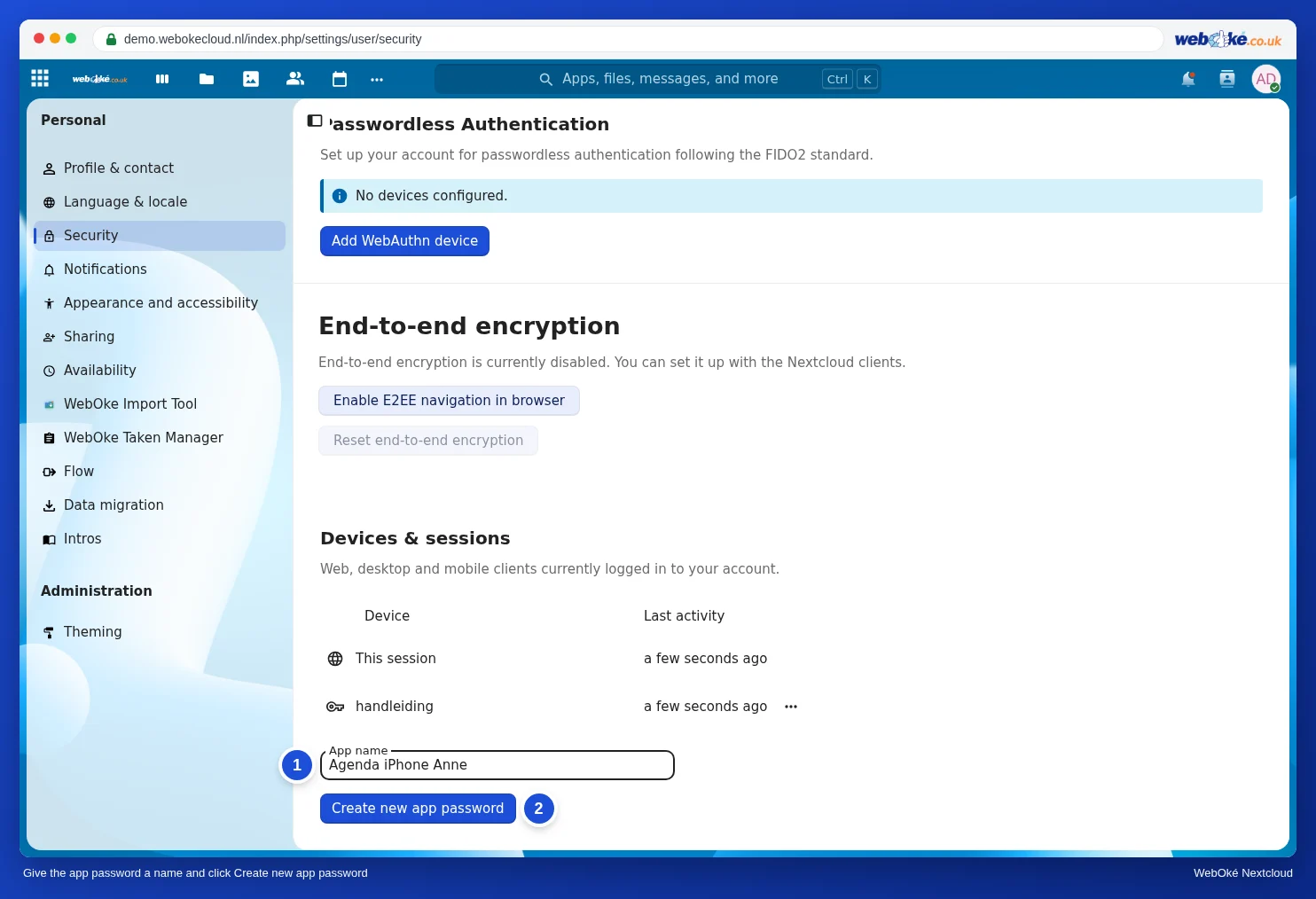
- Click Security on the left and scroll to Devices & sessions.
- Under App name (1), enter a name you'll recognise, for example Thunderbird laptop, and click Create new app password (2).
- You'll now see your Log in (your username) and a long Password. Keep this window open until you've finished in Thunderbird. The password is only shown once.

For more about app passwords, and how to revoke one, read App passwords: when and how.
Your email is separate
You add your mailbox to Thunderbird separately, with the email address and password of that mailbox (see Adding your email address automatically). That has nothing to do with your Nextcloud, even if you use the same email address.
Next: Adding your Nextcloud calendars and task lists and Adding your Nextcloud contacts.