
Sending mail from your VPS and setting up reverse DNS
Want to send mail from your VPS, for example with your own mail server or from a web shop? Two things matter: port 25 and reverse DNS.
Port 25 is closed by default
Outgoing traffic to port 25 (mail between mail servers) is blocked by default. This prevents a hacked VPS from sending spam and getting our IP addresses blacklisted, which would affect all customers.
- Sending mail through an external service or your own mailbox (port 587 or 465, with login) works fine. For most websites and shops that is the best choice.
- Want to run your own mail server? Open a ticket. We will check together that everything is set up properly and then open port 25 for you.
Reverse DNS (PTR)
Reverse DNS maps your IP addresses back to a name, for IPv4 and IPv6. Receiving mail servers check this: without proper reverse DNS your mail often lands in spam or is rejected. The name should also match the name your mail server announces (the HELO name).
Examples of a good name:
mail.yourdomain.comif your VPS sends mailserver.yourcompany.comorvps1.yourdomain.comfor general use
Set it up
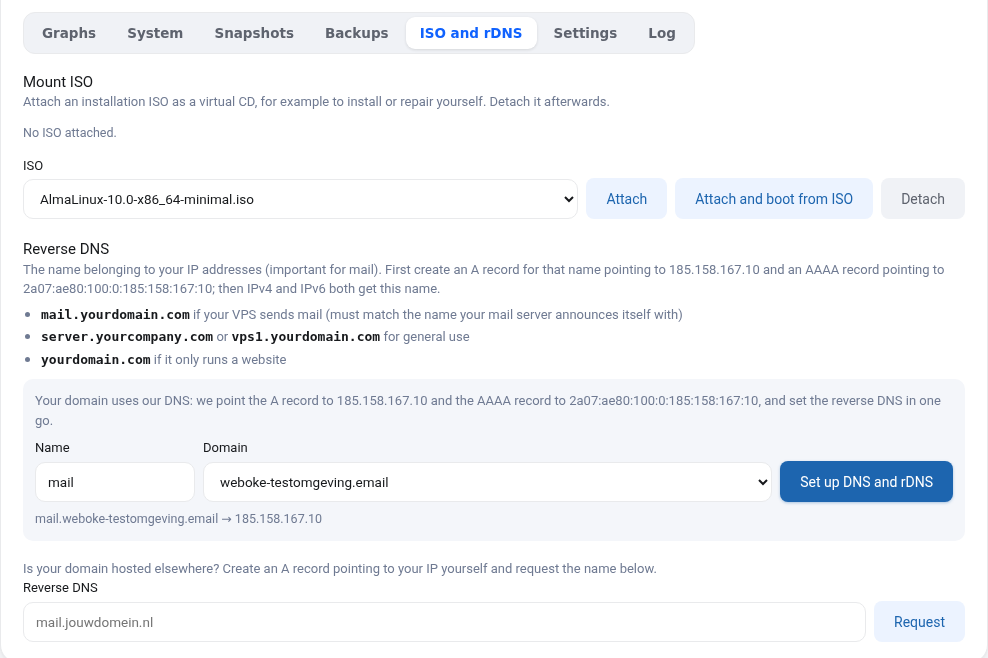
In your VPS screen, go to the ISO and rDNS tab.
- Is your domain's DNS hosted with us? Choose the domain and a name (for example
mail) and click Set up DNS and rDNS. We create the A and AAAA records and within a few minutes the reverse DNS for IPv4 and IPv6 is in place. - Is your domain hosted elsewhere? First create an A record for the name pointing to your IPv4 and an AAAA record pointing to your IPv6 (both shown in your VPS screen). Then enter the full name under Reverse DNS and click Request: the reverse DNS is set right away.
Check the result with dig -x your-ip-address or nslookup your-ip-address, for both addresses.
Do not forget SPF, DKIM and DMARC
Good delivery also needs an SPF record including your VPS IPs (ip4: and ip6:), DKIM signing by your mail server and a DMARC record. If your domain is with us, set them via DNS management under My Domains.
